How to install GRUB/LILO ?

Collapse
X
 
  • Time
  • Show
Clear All
new posts
  • AmberJain
    Recognized Expert Contributor
    • Jan 2008
    • 922

    How to install GRUB/LILO ?

    Hello,

    From many few days whenever I tried installing Xubuntu on my PC, I failed as Xubuntu installer simply couldnot startup. Whenever I booted from Xubuntu Cd both Live CD and Xubuntu installation refused to start. Both live CD and install routine initiated till a certain point then nothing happened for atleast 1 hour (I tried this many times) and the LED of CD drive simply flashed continuosly.

    Then I formatted my system yesterday (my XP installation was getting too heavy and I thought that would probbaly help me to install Xubuntu). But Xubuntu still failed to load/install from CD. Then I thought of something.

    The Xubuntu CD used to load succesfully (live + install) when Red hat linux was installed on my PC in the past. And so I installed Red hat linux 9 on my PC and then tried installing Xubuntu on another partition. And Xubuntu installation routine started and I installed Xubuntu successfully. But when I rebooted there was no bootloader (GRUB/LILO) to let me access Xubuntu. I tried as suggested to me previously in this thread but ended with no success. And then I installed XP on another partition.

    Now I want to simply install some Linux bootloader but I am unable to do so. I dont exactly remember the error message I get when I try to install GRUB and so I will post it in my next reply (when I would test it again).

    If you want some additional information tell me........

    Thanks in advance......
    AmbrNewlearner
  • micmast
    New Member
    • Mar 2008
    • 144

    #2
    That is just weird :)

    After you installed winXP does the bootloader work for winXP? If so, it might be easier to start your Linux with the Windows Bootloader.

    If you could somehow track the error of GRUB that would be nice.

    If you want to use your windows bootloader:
    • Boot a LiveCD
    • Type in a terminal: dd if=/dev/<device with /boot> of=/tmp/linux.bin bs=512 count=1
    • Copy the linux.bin over to your windows partition
    • Boot WindowsXP
    • Modify boot.ini (on your C:): C:\<path_to_lin ux.bin>="Your Xubuntu"
    • Reboot

    Comment

    • AmberJain
      Recognized Expert Contributor
      • Jan 2008
      • 922

      #3
      Hello,

      Originally posted by micmast
      That is just weird :)
      It's not just weird. It's the weirdest....... .. ;)


      Originally posted by micmast
      If you could somehow track the error of GRUB that would be nice.
      I dont know what is problem with installation of GRUB. But this is what happened at SLAX terminal:

      Code:
      root@slax:~# grub-install /dev/hdd
      /dev/hdd: Not found or not a block device.
      root@slax:~#
      I am ready to track this problem but I need guidance for what to do next.


      Originally posted by micmast
      After you installed winXP does the bootloader work for winXP? If so, it might be easier to start your Linux with the Windows Bootloader.
      Yes....XP bootloader worked.


      Originally posted by micmast
      If you want to use your windows bootloader:
      Boot a LiveCD
      Type in a terminal: dd if=/dev/<device with /boot> of=/tmp/linux.bin bs=512 count=1
      Copy the linux.bin over to your windows partition
      Boot WindowsXP
      Modify boot.ini (on your C:): C:\<path_to_lin ux.bin>="Your Xubuntu"
      Reboot
      Ok...I did as you advised. The output on SLAX terminal is:
      Code:
      root@slax:~# dd if=/dev/hdd6  of=/tmp/linux.bin bs=512 count=1
      1+0 records in
      1+0 records out
      512 bytes (512 B) copied, 4.0966e-05 s, 12.5 MB/s
      root@slax:~#
      Then I copied the linux.bin to E:\ (as my XP is installed on E:\Windows) inside SLAX and then I rebooted to XP.
      I edited boot.ini and added the following at the End of file:
      Code:
      E:\linux.bin="Your Xubuntu on e"
      When I rebooted and selected "Your Xubuntu on e" in XP bootloader, the screen went black for 1 or 2 seconds and came back to XP bootloader screen.

      That's it.....And I am still not able to log on to my Xubuntu installation.
      So I'm expecting more help here......

      Thanks......
      AmbrNewlearner
      Last edited by AmberJain; Sep 23 '08, 04:07 PM. Reason: corrected typo mistakes

      Comment

      • micmast
        New Member
        • Mar 2008
        • 144

        #4
        hmm I have to think about that, but for now you can try this:
        http://www.supergrubdi sk.org/

        This is an easy disk, burn it, run it and with a few keystrokes your grub should be back, mind you that windows XP might not be available, you still need to fix that probably

        Comment

        • micmast
          New Member
          • Mar 2008
          • 144

          #5
          could you give us a list of the partition table layout? Are you 100% sure that hdd is correct?

          Comment

          • AmberJain
            Recognized Expert Contributor
            • Jan 2008
            • 922

            #6
            Hello,

            First of all, I am sorry for replying so late. The reason was that I could not access http://www.supergrubdisk.org/ from my home. Yesterday I donwloaded Super GRUB disk and booted from it. But I could not install GRUB and I dont exactly remember the message it showed. But it said something like it could not detect any partitions with Xubuntu installed on my PC. So I now am going to REinstall Xubuntu and see if that helps. I will post back results soon.


            Originally posted by micmast
            could you give us a list of the partition table layout? Are you 100% sure that hdd is correct?
            I will post partition table layout if Xubuntu doesnot works even after REinstall.


            Thanks for all the help till now (and I hope to ask for more help from you)........
            AmbrNewlearner

            Comment

            • AmberJain
              Recognized Expert Contributor
              • Jan 2008
              • 922

              #7
              Hello,

              Some good news........Xub untu installed successfully. I dont exactly know the reason why I faced problems booting Xubuntu last time (when I started this thread) but I expect it to be some problem with partition structure on my PC (and thanks to this problem that I am now interested to read and study more about partitions:)).

              Now I face another problem regarding dual booting of XP and Xubuntu.

              First of all, a track of events is:
              I first formatted my harddisk. And then using PartitionMagic I created a ext2 partition (for Xubuntu), a swap partition, a FAT32 partition (for XP) and a backup FAT32 partition.
              Then I installed Xubuntu and using GRUB I was able to successfully log into Xubuntu. Then I installed XP on FAT32 partition and (as expected) XP bootloader simply replaced GRUB. And I was able to log into XP. Now if I try to install GRUB using SuperGRUBDisk then XP is not in list of GRUB.

              And I tried this too (from SLAX live CD):
              Code:
              root@slax:~# fdisk -l
              
              Disk /dev/hdd: 40.0 GB, 40060403712 bytes
              255 heads, 63 sectors/track, 4870 cylinders
              Units = cylinders of 16065 * 512 = 8225280 bytes
              Disk identifier: 0x000d030b
              
                 Device Boot      Start         End      Blocks   Id  System
              /dev/hdd1   *           1        1020     8193118+  83  Linux
              /dev/hdd2            1021        1054      273105   82  Linux swap
              /dev/hdd3            1055        2329    10241437+   c  W95 FAT32 (LBA)
              /dev/hdd4            2330        4870    20410582+   f  W95 Ext'd (LBA)
              /dev/hdd5            2330        4870    20410551    b  W95 FAT32
              root@slax:~# dd if=/dev/hdd1 of=/linux.bin bs=512 count=1
              1+0 records in
              1+0 records out
              512 bytes (512 B) copied, 3.064e-05 s, 16.7 MB/s
              root@slax:~#
              And then I added a entry to C:\boot.ini (as you advised me previously). But when XP boot loader comes up and I select "XUBUNTU" I get a blck screen (xubuntu doesnot starts).

              The code tagged text above also lists my partition table layout. Now what should I do to dual boot XP and Xubuntu.

              Thanks for help.......
              AmbrNewlearner

              Comment

              • AmberJain
                Recognized Expert Contributor
                • Jan 2008
                • 922

                #8
                Hello,

                :) Some good news here.......The problem has solved. If I recite my mistakes here then that may help someone in future. And so, in a day or two I will post the MISTAKES I was making while installation of Xubuntu on my PC (right now I'm in hurry).

                BTW, Thanks micmast for all the help ;).......


                Cheers,
                AmbrNewlearner

                Comment

                • micmast
                  New Member
                  • Mar 2008
                  • 144

                  #9
                  no problemo, that is why I joined bytes :)

                  I'm really curious to know what caused the problems.
                  Last edited by micmast; Sep 28 '08, 09:43 AM. Reason: Bad english spelling

                  Comment

                  • AmberJain
                    Recognized Expert Contributor
                    • Jan 2008
                    • 922

                    #10
                    Hello,

                    Before I start let me tell you that I have switched to PC LinuxOS from Xubuntu (as Xubuntu was too slow on my PC).


                    This is a log file of mistakes I made when I tried installing Xubuntu on my PC ;)

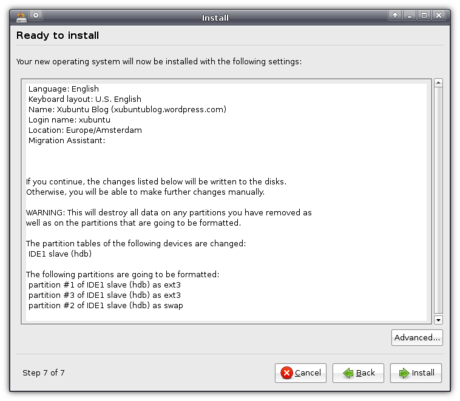
                    When we install Xubuntu then a screen comes up which looks like:


                    Now if I click on advanced button then I get an option to choose the location where I would like bootloader to be installed. The default is displayed something like hd0 but I changed it to the root of my Xubuntu installation and so either GRUB or XP bootloader worked at a time and I couldnot dualboot XP and Xubuntu together.


                    Originally posted by micmast
                    dd if=/dev/hdd6 of=/tmp/linux.bin bs=512 count=1
                    But I dont know why this doesnot worked at that time. I will certainly try it on PC linuxOS when I get time.

                    Hope I vomitted it all here.........

                    Thanks...
                    AmbrNewlearner

                    Comment

                    • Nepomuk
                      Recognized Expert Specialist
                      • Aug 2007
                      • 3111

                      #11
                      Originally posted by ambrnewlearner
                      ...The default is displayed something like hd0 but I changed it to the root of my Xubuntu installation and so either GRUB or XP bootloader worked at a time and I couldnot dualboot XP and Xubuntu together.
                      So, are you saying that you wanted to have the option to dualboot but it didn't work? I'm asking, because I'm not quite sure, that I understood you correctly.
                      Originally posted by ambrnewlearner
                      But I dont know why this doesnot worked at that time. I will certainly try it on PC linuxOS when I get time.
                      What exactly were you trying to do with that command? I guess that only with that knowledge, we might be able to find out, why it didn't work.

                      Greetings,
                      Nepomuk

                      Comment

                      • AmberJain
                        Recognized Expert Contributor
                        • Jan 2008
                        • 922

                        #12
                        Hello,

                        Originally posted by nepomuk
                        So, are you saying that you wanted to have the option to dualboot but it didn't work? I'm asking, because I'm not quite sure, that I understood you correctly.
                        Yup....you are right. I wanted to dual boot XP and Xubuntu but I could either login to Xubuntu using GRUB or to XP using Windows bootloader at a time.

                        Originally posted by nepomuk
                        What exactly were you trying to do with that command? I guess that only with that knowledge, we might be able to find out, why it didn't work.
                        Well, I was trying to dual boot (XP + Xubuntu) using Windows bootloader. I wanted to do as guided to me by micmast in REPLY #2 above.
                        And OOPS........... ...I almost forgot to try this on PC linux OS. Thanks nepomuk for reminding me.....I will now try this and will post back results soon.

                        Thanks.........
                        AmbrNewlearner

                        Comment

                        Working...