Vb.net sql help needed

Collapse
X
 
  • Time
  • Show
Clear All
new posts
  • Gmez
    New Member
    • Jan 2009
    • 4

    Vb.net sql help needed

    Hi there, I'm a bit of a newbie to vb express 2008 and need a bit of assistance please!

    I have 3 tables in a database (Order, Personnel, Products) and need to be able to manipulate the data. I (think I) know the commands to use are SELECT ... FROM, INPUT, DELETE but I have no idea when it comes to establishing a connection to the database so that the data can be manipulated.

    The various input data (such as surname, DOB etc) comes from various textboxes that I have created on a form and this is then transfered to variables from which I hope to enter into the database when a button is clicked.

    I've been tearing my hair out over this so any help would be very much appreciated!
  • jg007
    Contributor
    • Mar 2008
    • 283

    #2
    basically you will need to establish a connection and then run a query against the database to return a set of data which you can then use as required

    there are plenty of tutorials on the web , from a quick google this one looks pretty straight forward - Part 2 - Using ADO .NET - Access and OleDB

    if you have specific questions on the code feel free to post but as with many other sites it is better if you try to work things out first and then ask about problems you experience with the code.

    Comment

    • lotus18
      Contributor
      • Nov 2007
      • 865

      #3
      Could you specify what database are you using?

      Rey Sean

      Comment

      • jg007
        Contributor
        • Mar 2008
        • 283

        #4
        sorry, I should have added -

        I presume that you are using an SQL server and although the link I have given is for Access it is pretty much the same except for the connection strings

        Comment

        • Gmez
          New Member
          • Jan 2009
          • 4

          #5
          Hey thanks for the replies.

          I'm using an SQL database that I have set up inside the IDE. The thing that currently confuses me is the use of the connection strings but I'm sure that more confusion will arise afterwards!

          I'll have a read of the link and investigate further.

          Edit: I've also stumbled upon a guide Link which I'll have a look at.

          Thanks again :)

          Comment

          • Gmez
            New Member
            • Jan 2009
            • 4

            #6
            Ok having had a look at the guide I found I've come up with this:

            Code:
            Dim connection_string As String = "data source=C:\Documents and Settings\Home\Desktop\VB\Project\Database.sdf" 
                    Dim db_con As SqlConnection
                    Dim sql_con As New SqlCommand
            
                    db_con = New SqlConnection(connection_string)
                    sql_con.Connection = db_con
                    sql_con.CommandType = CommandType.Text
                    sql_con.CommandText = "INSERT INTO PERSONNEL(Username, Password, First name, Surname, DOB, Start date, Status)""VALUES (@Username, @Password, @First name, @Surname, @DOB, @Start date, @Status)"
            
                    sql_con.Parameters.Add("@Employee ID", SqlDbType.NVarChar).Value = 4
                    sql_con.Parameters.Add("@Username", SqlDbType.NText).Value = username
                    sql_con.Parameters.Add("@Password", SqlDbType.NText).Value = password
                    sql_con.Parameters.Add("@First name", SqlDbType.NText).Value = first_name
                    sql_con.Parameters.Add("@Surname", SqlDbType.NText).Value = surname
                    sql_con.Parameters.Add("@DOB", SqlDbType.Date).Value = DOB
                    sql_con.Parameters.Add("@Start date", SqlDbType.Date).Value = start_date
                    sql_con.Parameters.Add("@Status", SqlDbType.NChar).Value = status
            
                    Try
                        db_con.Open()
                        sql_con.ExecuteReader()
                        db_con.Close()
                    Catch ex As Exception
            
                    End Try
            However when I exit the program nothing has changed in the database. Does what I'm doing at the moment actually save the database once the data has been inserted?

            Cheers
            Last edited by Curtis Rutland; Jan 12 '09, 01:55 PM. Reason: please use [CODE] tags when posting code

            Comment

            • truezplaya
              New Member
              • Jul 2007
              • 115

              #7
              Code:
              "INSERT INTO PERSONNEL(Username, Password, First name, Surname, DOB, Start date, Status)""VALUES (@Username, @Password, @First name, @Surname, @DOB, @Start date, @Status)"
              Don't you have a few too many " in your sql string?
              They should only be around the sql string like so

              Code:
              "INSERT INTO PERSONNEL(Username, Password, First name, Surname, DOB, Start date, Status) VALUES (@Username, @Password, @First name, @Surname, @DOB, @Start date, @Status)"
              Last edited by Curtis Rutland; Jan 12 '09, 01:56 PM. Reason: Please use [CODE] tags when posting [CODE]

              Comment

              • Gmez
                New Member
                • Jan 2009
                • 4

                #8
                Thanks for the tip, although I'm still not sure what to do to get it to save! I've replaced:

                Code:
                db_con.Open()
                sql_con.ExecuteReader()
                db_con.Close()
                with

                Code:
                db_con.Open()
                sql_con.ExecuteNonQuery()
                db_con.Close()
                but still no difference. :(

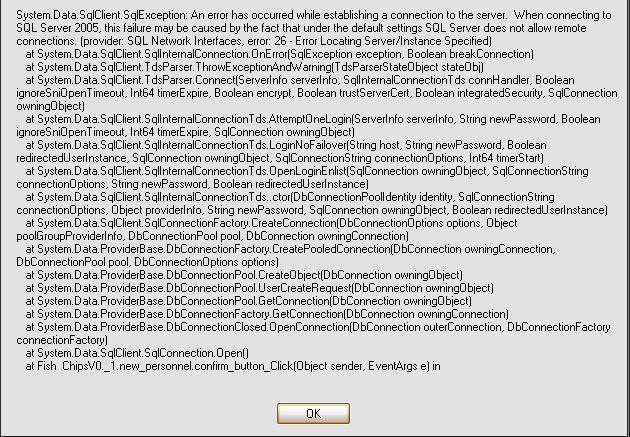
                Edit: Ok having put a message box to open in the event of an exception it's come out with this:

                Can anyone decipher that? Thanks again.

                Comment

                • raids51
                  New Member
                  • Nov 2007
                  • 59

                  #9
                  yea basically that error message is telling you that your server doesnt accept remote sql connections... is the server in your local network? changing the properties on the server to allow remote sql connections might do the trick, or it might be something else... either way im not necessarily the person to ask about fixing it, im not all that good at networking but i hope this helped

                  Comment

                  Working...