Overflowing DIV

Collapse
X
 
  • Time
  • Show
Clear All
new posts
  • gearoid
    New Member
    • Mar 2008
    • 21

    Overflowing DIV

    In a new site Im styling, I'm using a 3 column layout. However, the problem is that the two side divs seem to be flowing out of their container. The container is the div with the black border around it:
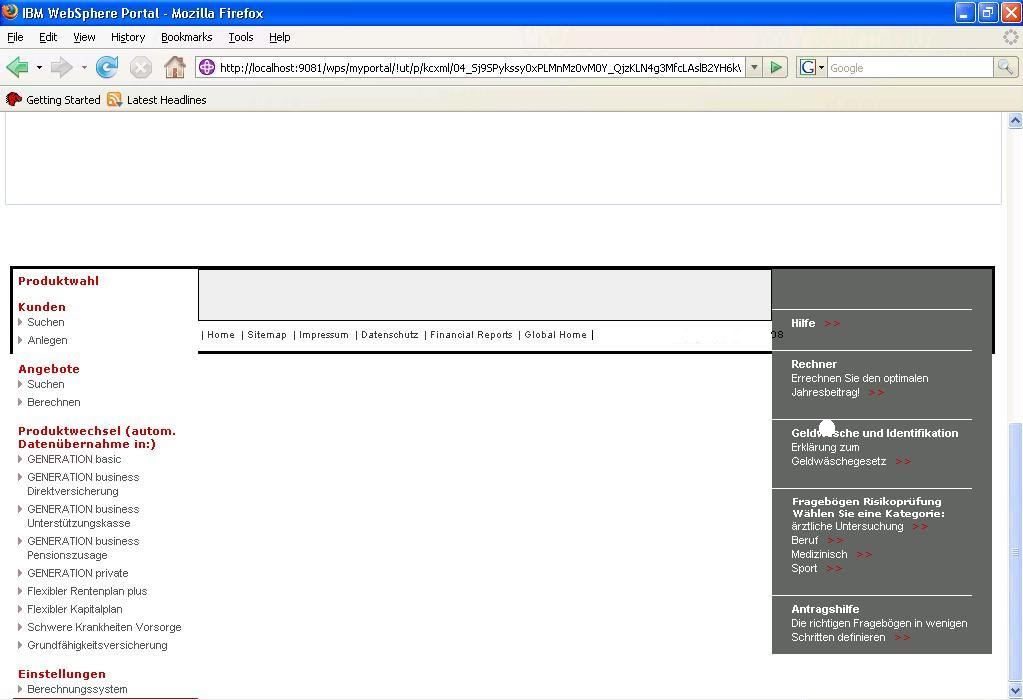


    I am these 3 divs in a container in hope that the footer will display below the lowest div of the 3. It currently just sits below the centre div.

    Any advice/tips on the subject would be great, thanks.
  • drhowarddrfine
    Recognized Expert Expert
    • Sep 2006
    • 7434

    #2
    How to get a quicker, more complete answer.

    Comment

    • gearoid
      New Member
      • Mar 2008
      • 21

      #3
      I think its pretty obvious that I can't provide a link since the site is intranet based (which I've mentioned before).

      Heres the relevant css:

      Code:
      /* CSS adapted from module 9 css.alsacreations.com */
      body {
      	font-family: Verdana, Arial, Helvetica, sans-serif;
      	font-size: 0.8em;
      	margin: 0;
      	padding: 0;
      }
      #header {
      	height: 100px;
      	/*background-color: #99CCCC;*/
      }
      #subnav {
      	height: 30px;
      	/*background-color:#CCCCFF;*/
      }
      
      
      #container {
      	position:relative;
      	top:500px;
      	border: 3px solid black;
      	}
      
      #centre {
      	padding: 25px 25px 25px 25px;
      	background-color:#EEEEEE;
      	margin-left: 185px;
      	margin-right: 220px;
      	border: solid 1px #000;
      	}
      	
      #left {
      	border: solid 10px #000;
      	//position: absolute;
      	//left:0;
      	width: 185px;
      	//overflow:hidden;
      }
      
      .leftnavi{
        background-color:white; 
        color:#cc0000; 
        margin: 0px 0px 0px 0px; 
        padding:5px 0px 0px 5px; 
        font-size:11px; 
        font-weight:bold; 
        width:180px; 
        border:1px solid #cc0000;
        
      }
      
      #right {
      	position: absolute;
      	right:0;
      	width: 220px;
      	border: solid 2px #000;
      	background-color:#666666;
      	border: solid 1px #000;
      }
      #footer {
      	//positon:relative;
      	height: 30px;
      	/*background-color: #99CC99;*/
      	border: solid 1px #000;
      }
      
      #footer, #header, #left, #right, #subnav
      {
      	border: solid 0px #000;
      }

      Comment

      • Death Slaught
        Top Contributor
        • Aug 2007
        • 1137

        #4
        When making three column layout please remember that when setting the width of your container division you need to count in the borders, margin, and padding of your child divisions. Also, please post your HTML so we can see if there is anything there that may be inacurate.

        Thanks, Death

        Comment

        • drhowarddrfine
          Recognized Expert Expert
          • Sep 2006
          • 7434

          #5
          As Death said, without the html, we only know what the right hand is doing and not the left. Potentially, your problem arises from setting the right column absolutely. This removes that div from the normal flow causing it to rise up to the first positioned element.

          Comment

          Working...