Button Rollover/rollout problems

Collapse
X
 
  • Time
  • Show
Clear All
new posts
  • Flan
    New Member
    • Oct 2007
    • 7

    Button Rollover/rollout problems

    I am running on a Mac, with FlashCS3, using Actionscript 3.0.

    First I'm going to say that I am really new to Actionscript. (As in, only been using for a few days new.) So please excuse me if I don't have the terminology down completely.

    I am trying to create an interactive button where upon "rolling over" a certain movie clip is played, and upon "rolling out" another movie clip is played. I know, fairly simple, right?

    After trying this by altering the the button's over state and having it not work, I read in a book that you can create movie clips that behave like buttons.

    So I have done this. The clip-button is called "btn_red" In the main timeline, I have the layer with this button, and an actions layer.*

    Within btn_red, I have this:
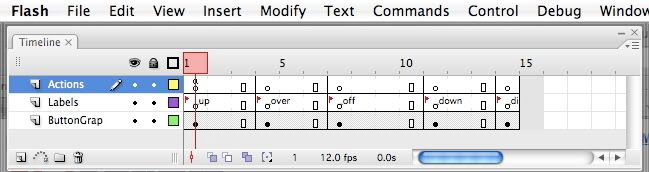

    The actions layer you see above has this code attached to it:
    Code:
    stop();
    buttonMode = true;
    The labels layer is just button states, the last one being "disabled."

    The button graphics layer has two movie clips, one for the "over" and one for the "off." Within the movie clips are just basic graphics and text with motion tweens and alpha effects attached. The movie clips are "btn_rd_anim_in " and "btn_rd_anim_ou t."

    Okay, now back to the main timeline. The actions layer mentioned above with the asterick.

    My code is this:

    Code:
    //disabled function
    stop();
    // code_hint comments
    // MovieClip btn_red;
    
    // event handlers
    function handleClick( pEvent:MouseEvent ):void
    {
    	if( pEvent == btn_red )
    	{
    		//handle event
    		btn_red.enabled = false;
    		btn_red.gotoAndStop( "_Disabled" );
    	}
    }
    // register events
    btn_red.addEventListener( MouseEvent.CLICK. handleClick );
    
    //over function
    stop();
    // code_hint comments
    // MovieClip btn_red;
    
    // event handlers
    function handleROLL_OVER( pEvent:MouseEvent ):void
    {
    	if( pEvent == btn_rd )
    	{
    		//handle event
    		btn_red.ROLL_OVER = true
    		gotoAndPlay("_over")
    	}
    }
    // register events
    btn_red.addEventListener( MouseEvent.ROLL_OVER, handleRollOver );
    
    //off function
    stop();
    // code_hint comments
    // MovieClip btn_red;
    function handleROLL_OUT( pEvent:MouseEvent ):void
    {
    	if( pEvent == btn_rd )
    	{
    		//handle event
    		btn_red.ROLL_OUT == true
    		gotoAndPlay("_off")
    	}
    }
    // register events
    btn_red.addEventListener( MouseEvent.ROLL_OUT, handleRollOut );
    stop();
    ***post continued in comment, for some reason would not let me continue here.**
    Last edited by Flan; Oct 20 '07, 02:43 AM. Reason: Cut out bottom of text
  • Flan
    New Member
    • Oct 2007
    • 7

    #2
    **Continued from Above**

    I am getting these errors upon playing through "Test Movie":

    1176: Comparison between a value with static type flash.events:Mo useEvent and a possibly unrelated type flash.display:M ovieClip. (Line 9)

    1120: Access of undefined property btn_rd. (Line 27)

    1120: Access of undefined property btn_rd. (Line 43)

    1119: Access of possibly undefined property handleClick through a reference with static type String. (Line 17)

    1136: Incorrect number of arguments. Expected 2. (Line 52)

    1120: Access of undefined property handleRollOver. (Line 35)

    1120: Access of undefined property handleRollOut. (Line 51)

    Any help would be really appreciated. I have worked over this for hours and still cannot find a problem....

    Thank you!

    Comment

    • rsdev
      New Member
      • Jul 2007
      • 149

      #3
      Originally posted by Flan
      **Continued from Above**

      I am getting these errors upon playing through "Test Movie":

      1176: Comparison between a value with static type flash.events:Mo useEvent and a possibly unrelated type flash.display:M ovieClip. (Line 9)

      1120: Access of undefined property btn_rd. (Line 27)

      1120: Access of undefined property btn_rd. (Line 43)

      1119: Access of possibly undefined property handleClick through a reference with static type String. (Line 17)

      1136: Incorrect number of arguments. Expected 2. (Line 52)

      1120: Access of undefined property handleRollOver. (Line 35)

      1120: Access of undefined property handleRollOut. (Line 51)

      Any help would be really appreciated. I have worked over this for hours and still cannot find a problem....

      Thank you!
      Hi Flan,

      I'm an AS 2.0 developer haven't started looking at 3.0 yet.

      In 2.0 you wouldn't use event handler functions like this, behaviours are established in the MovieClip class. Like on(rollover), on(rollout), on(press), on(release) etc. In AS 2.0 you would simple tell the movieclip to gotoAndStop("_o ver");

      Code:
      on(rollover)
      {
      this.gotoAndStop("over");
      }
      Maybe things are different in AS 3.0.?? Let me know.

      Comment

      • Flan
        New Member
        • Oct 2007
        • 7

        #4
        Originally posted by rsdev
        Hi Flan,

        I'm an AS 2.0 developer haven't started looking at 3.0 yet.

        In 2.0 you wouldn't use event handler functions like this, behaviours are established in the MovieClip class. Like on(rollover), on(rollout), on(press), on(release) etc. In AS 2.0 you would simple tell the movieclip to gotoAndStop("_o ver");

        Code:
        on(rollover)
        {
        this.gotoAndStop("over");
        }
        Maybe things are different in AS 3.0.?? Let me know.
        I think that they are different. I tried the code with my own info put in, and unfortunately it didn't work..

        Thank you, though.

        Comment

        • rsdev
          New Member
          • Jul 2007
          • 149

          #5
          Hi Flan,

          Looking up some 3.0 references it seems you headed down the right road. These functions should exist in a class that extends the movieclip class.

          Line (9) you are checking to see if a mouseevent is == to movieclip instance.

          I think you want to check against the CLICK string. CLICK : String = "click"

          Code:
          if(pEvent == "click")
          line (27) typo btn_rd should be btn_red but this needs to be;

          Code:
          if(pEvent == "rollOver")
          Line (17) is a type ',' instead of '.'

          Line (35)&&(51) is another typo AS is case sensitive.

          Line (52) stop(); is used in either to stop the timeline or stop media playback.

          These functions should be inside a class, so you don't need this command.

          Comment

          • Flan
            New Member
            • Oct 2007
            • 7

            #6
            Originally posted by rsdev
            Hi Flan,

            Looking up some 3.0 references it seems you headed down the right road. These functions should exist in a class that extends the movieclip class.

            Line (9) you are checking to see if a mouseevent is == to movieclip instance.

            I think you want to check against the CLICK string. CLICK : String = "click"

            Code:
            if(pEvent == "click")
            line (27) typo btn_rd should be btn_red but this needs to be;

            Code:
            if(pEvent == "rollOver")
            Line (17) is a type ',' instead of '.'

            Line (35)&&(51) is another typo AS is case sensitive.

            Line (52) stop(); is used in either to stop the timeline or stop media playback.

            These functions should be inside a class, so you don't need this command.
            I am still getting this error on lines 9, 27, and 43:
            "1176:Compariso n between a value with static type flash.events:Mo useEvent and a possibly unrelated type String."

            It seems as though Flash isn't registering my movieclip as a button, and I don't know why...

            I got this code in another forum, but I'm not sure if adding the second line would be redundant, as I already put it within the movieclip itself, or if I need it there as well. I am also not sure how to incorporate the addchild function into my script.

            Code:
            my_btn.addEventListener(MouseEvent.CLICK, myFunction);
            my_btn.buttonMode = true;
            function myFunction(event:MouseEvent):void {
            	//do something
            }
            addChild(my_btn);
            Thank you once again for your help.

            Comment

            • xNephilimx
              Recognized Expert New Member
              • Jun 2007
              • 213

              #7
              Hi Flan!
              I'll get to your errors before this:
              Rsdev: In AS3 you MUST use event handlers to register events, behaviours are now deprecated.

              Now, Flan
              The errors are quite simple. I'll explain them to you one by one:

              -1176: Comparison between a value with static type flash.events:Mo useEvent and a possibly unrelated type flash.display:M ovieClip. (Line 9):
              In the line 9 of your code you have:
              if( pEvent == btn_red )
              pEvent is a MouseEvent, not the button itself, if you need to get the button that recieves the event, you should do:

              pEvent.target

              The target of the event is the button that, in this case, has been clicked, so pEvent.target will return the actual button.
              Anyway, I don't quite understand the purpose of that condition...

              1120: Access of undefined property btn_rd. (Line 27)
              and
              1120: Access of undefined property btn_rd. (Line 43)
              :

              Your are getting those errors because of a typo! You put btn_rd, instead if btn_red.

              1119: Access of possibly undefined property handleClick through a reference with static type String. (Line 17):
              This error is because of a typo, also!
              You have
              btn_red.addEven tListener( MouseEvent.CLIC K. handleClick );
              on line 17, and you should have this:
              btn_red.addEven tListener( MouseEvent.CLIC K, handleClick );
              Notice the comma after the MouseEvent.CLIC K? You put a dot, and should be a comma.

              1136: Incorrect number of arguments. Expected 2. (Line 52):
              That error is probably being draged since the line 51 where you put as a callback for the event the function handleRollOut, and that function does not exists, remember that AS is case sensitive, your function is called handleROLL_OUT.
              Anyway, that stop(); in line 52 is not nessesary, since you already put one in the beggining of your code for that frame.

              1120: Access of undefined property handleRollOver. (Line 35):
              Same as above, your function is handleROLL_OVER , not handleRollOver

              1120: Access of undefined property handleRollOut. (Line 51)
              I already explaind this in the error 1136.

              Now that you now what is causing them, you should be able to correct them.

              One more thing: declaring the buttonMode for the movieclip that will be acting as one is very important, since it makes it show the hand curson on roll over letting the user know that he can click it. You do it like this:

              btn_red.buttonM ode = true;

              It is not vital, since it will work anyways without that, the thing is you won't get the hand cursor when hovering the button, and that will make users think it is not a button.

              Best regards,
              The_Nephilim

              Comment

              • Flan
                New Member
                • Oct 2007
                • 7

                #8
                Originally posted by xNephilimx
                Hi Flan!
                I'll get to your errors before this:
                Rsdev: In AS3 you MUST use event handlers to register events, behaviours are now deprecated.

                Now, Flan
                The errors are quite simple. I'll explain them to you one by one:

                -1176: Comparison between a value with static type flash.events:Mo useEvent and a possibly unrelated type flash.display:M ovieClip. (Line 9):
                In the line 9 of your code you have:
                if( pEvent == btn_red )
                pEvent is a MouseEvent, not the button itself, if you need to get the button that recieves the event, you should do:

                pEvent.target

                The target of the event is the button that, in this case, has been clicked, so pEvent.target will return the actual button.
                Anyway, I don't quite understand the purpose of that condition...

                1120: Access of undefined property btn_rd. (Line 27)
                and
                1120: Access of undefined property btn_rd. (Line 43)
                :

                Your are getting those errors because of a typo! You put btn_rd, instead if btn_red.

                1119: Access of possibly undefined property handleClick through a reference with static type String. (Line 17):
                This error is because of a typo, also!
                You have
                btn_red.addEven tListener( MouseEvent.CLIC K. handleClick );
                on line 17, and you should have this:
                btn_red.addEven tListener( MouseEvent.CLIC K, handleClick );
                Notice the comma after the MouseEvent.CLIC K? You put a dot, and should be a comma.

                1136: Incorrect number of arguments. Expected 2. (Line 52):
                That error is probably being draged since the line 51 where you put as a callback for the event the function handleRollOut, and that function does not exists, remember that AS is case sensitive, your function is called handleROLL_OUT.
                Anyway, that stop(); in line 52 is not nessesary, since you already put one in the beggining of your code for that frame.

                1120: Access of undefined property handleRollOver. (Line 35):
                Same as above, your function is handleROLL_OVER , not handleRollOver

                1120: Access of undefined property handleRollOut. (Line 51)
                I already explaind this in the error 1136.

                Now that you now what is causing them, you should be able to correct them.

                One more thing: declaring the buttonMode for the movieclip that will be acting as one is very important, since it makes it show the hand curson on roll over letting the user know that he can click it. You do it like this:

                btn_red.buttonM ode = true;

                It is not vital, since it will work anyways without that, the thing is you won't get the hand cursor when hovering the button, and that will make users think it is not a button.

                Best regards,
                The_Nephilim
                Thanks so much! You managed to clear me of all my error messages. I am still having one problem, however. I want the button, on rollover, to have a menu bar fade outwards, and on rollout, to have it fade back in. However, instead of this, it keeps looping. This is my code thus far.

                Code:
                //disabled function
                stop();
                // code_hint comments
                // MovieClip btn_red;
                
                // event handlers
                function handleClick( pEvent:MouseEvent ):void
                {
                	if( pEvent.target )
                	{
                		//handle event
                		mc_btn_red.buttonMode = true;
                		mc_btn_red.enabled = false;
                		mc_btn_red.gotoAndStop( "_Disabled" );
                	}
                }
                // register events
                mc_btn_red.addEventListener( MouseEvent.CLICK, handleClick );
                
                //over function
                stop();
                // code_hint comments
                // MovieClip mc_btn_red;
                
                // event handlers
                function handleROLL_OVER( pEvent:MouseEvent ):void
                {
                	if( pEvent.target )
                	{
                		//handle event
                		mc_btn_red.buttonMode = true;
                		mc_btn_red.ROLL_OVER = true;
                		mc_btn_red.gotoAndPlay("_over");
                	}
                }
                // register events
                mc_btn_red.addEventListener( MouseEvent.ROLL_OVER, handleROLL_OVER );
                
                //off function
                stop();
                // code_hint comments
                // MovieClip btn_red;
                function handleROLL_OUT( pEvent:MouseEvent ):void
                {
                	if( pEvent.target)
                	{
                		//handle event
                		mc_btn_red.buttonMode = true;
                		mc_btn_red.ROLL_OUT == true;
                		mc_btn_red.gotoAndPlay("_off");
                	}
                }
                // register events
                mc_btn_red.addEventListener( MouseEvent.ROLL_OUT, handleROLL_OUT );
                Thanks once again! You may just have saved my midterm project. I've literally been using actionscript for only a week or so, so I'm sorry if my questions are basic and stupid.

                Comment

                • xNephilimx
                  Recognized Expert New Member
                  • Jun 2007
                  • 213

                  #9
                  Hi!
                  Don't worry about asking, AS3 is a difficult language to start learning, and you got it pretty good.

                  Looking at your code I think that the menu is inside that mc_btn_red, am I right?
                  You may be forgot to put a stop in the key frames. I mean, your movielclip button has 3 keyframes that are the three states of a button, on, over, out, for example, so when you roll over you make gotoAndPlay('_o ver'); but since there are no stops in the frames it will start playing from the _over frame and won't stop.

                  Suppose you button's timeline is something like this:

                  (The º are the keyframes)
                  Code:
                  º--------º--------º--------º
                  |on------|over----|out-----|
                  Try putting in each keyframe a stop(); and see what happens.

                  Also, the "if" you have in each function, in not necessary

                  Best regards,
                  The_Nephilim

                  Originally posted by Flan
                  Thanks so much! You managed to clear me of all my error messages. I am still having one problem, however. I want the button, on rollover, to have a menu bar fade outwards, and on rollout, to have it fade back in. However, instead of this, it keeps looping. This is my code thus far.

                  Code:
                  //disabled function
                  stop();
                  // code_hint comments
                  // MovieClip btn_red;
                  
                  // event handlers
                  function handleClick( pEvent:MouseEvent ):void
                  {
                  	if( pEvent.target )
                  	{
                  		//handle event
                  		mc_btn_red.buttonMode = true;
                  		mc_btn_red.enabled = false;
                  		mc_btn_red.gotoAndStop( "_Disabled" );
                  	}
                  }
                  // register events
                  mc_btn_red.addEventListener( MouseEvent.CLICK, handleClick );
                  
                  //over function
                  stop();
                  // code_hint comments
                  // MovieClip mc_btn_red;
                  
                  // event handlers
                  function handleROLL_OVER( pEvent:MouseEvent ):void
                  {
                  	if( pEvent.target )
                  	{
                  		//handle event
                  		mc_btn_red.buttonMode = true;
                  		mc_btn_red.ROLL_OVER = true;
                  		mc_btn_red.gotoAndPlay("_over");
                  	}
                  }
                  // register events
                  mc_btn_red.addEventListener( MouseEvent.ROLL_OVER, handleROLL_OVER );
                  
                  //off function
                  stop();
                  // code_hint comments
                  // MovieClip btn_red;
                  function handleROLL_OUT( pEvent:MouseEvent ):void
                  {
                  	if( pEvent.target)
                  	{
                  		//handle event
                  		mc_btn_red.buttonMode = true;
                  		mc_btn_red.ROLL_OUT == true;
                  		mc_btn_red.gotoAndPlay("_off");
                  	}
                  }
                  // register events
                  mc_btn_red.addEventListener( MouseEvent.ROLL_OUT, handleROLL_OUT );
                  Thanks once again! You may just have saved my midterm project. I've literally been using actionscript for only a week or so, so I'm sorry if my questions are basic and stupid.

                  Comment

                  • Flan
                    New Member
                    • Oct 2007
                    • 7

                    #10
                    Originally posted by xNephilimx
                    Hi!
                    Don't worry about asking, AS3 is a difficult language to start learning, and you got it pretty good.

                    Looking at your code I think that the menu is inside that mc_btn_red, am I right?
                    You may be forgot to put a stop in the key frames. I mean, your movielclip button has 3 keyframes that are the three states of a button, on, over, out, for example, so when you roll over you make gotoAndPlay('_o ver'); but since there are no stops in the frames it will start playing from the _over frame and won't stop.

                    Suppose you button's timeline is something like this:

                    (The º are the keyframes)
                    Code:
                    º--------º--------º--------º
                    |on------|over----|out-----|
                    Try putting in each keyframe a stop(); and see what happens.

                    Also, the "if" you have in each function, in not necessary

                    Best regards,
                    The_Nephilim
                    Yes, I tried that too. Is there a way to define the hit state of an mc button? The book I've been using says it's uneccessary, but it doesn't say if you can or not. I think that may be the problem, though I could be wrong.

                    Comment

                    • xNephilimx
                      Recognized Expert New Member
                      • Jun 2007
                      • 213

                      #11
                      The book is right, it's not necessary, the hit area for your button will be every part of it's content, so if your button were a circle, all the circle will be the hit area. Anyway, if you need to make a hit area, maybe 'cause your button has an irregular shape with holes or something, you can do a transparent shape, so the user won't see it but it will be there, clickable and all.

                      Anyway I really don't think that's the problem. First get rid of the if( pEvent.target) in the functions, then see if you could upload your fla file, so I can check all of it and see if I find the problem.

                      Best regards
                      The_Nephilim

                      Originally posted by Flan
                      Yes, I tried that too. Is there a way to define the hit state of an mc button? The book I've been using says it's uneccessary, but it doesn't say if you can or not. I think that may be the problem, though I could be wrong.

                      Comment

                      • Flan
                        New Member
                        • Oct 2007
                        • 7

                        #12
                        Originally posted by xNephilimx
                        The book is right, it's not necessary, the hit area for your button will be every part of it's content, so if your button were a circle, all the circle will be the hit area. Anyway, if you need to make a hit area, maybe 'cause your button has an irregular shape with holes or something, you can do a transparent shape, so the user won't see it but it will be there, clickable and all.

                        Anyway I really don't think that's the problem. First get rid of the if( pEvent.target) in the functions, then see if you could upload your fla file, so I can check all of it and see if I find the problem.

                        Best regards
                        The_Nephilim
                        For some reason my file was lost. I had to go back and start from scratch, but the good thing is that I can use actionscript 2.0. Much much easier. I got everything to work. Thank you for your help. :)

                        Comment

                        • xNephilimx
                          Recognized Expert New Member
                          • Jun 2007
                          • 213

                          #13
                          Oh, that bites!
                          Well, if you feel mor comfortable with AS2 it's a good thing.
                          Anyway, if you ever got good practice with AS3 you won't go back using AS2, I tell you, it happened to me LOL

                          Best regards!
                          The_Nephilim

                          Originally posted by Flan
                          For some reason my file was lost. I had to go back and start from scratch, but the good thing is that I can use actionscript 2.0. Much much easier. I got everything to work. Thank you for your help. :)

                          Comment

                          Working...