
 Button Rollover/rollout problems
I am running on a Mac, with FlashCS3, using Actionscript 3.0.
First I'm going to say that I am really new to Actionscript. (As in, only been using for a few days new.) So please excuse me if I don't have the terminology down completely.
I am trying to create an interactive button where upon "rolling over" a certain movie clip is played, and upon "rolling out" another movie clip is played. I know, fairly simple, right?
After trying this by altering the the button's over state and having it not work, I read in a book that you can create movie clips that behave like buttons.
So I have done this. The clip-button is called "btn_red" In the main timeline, I have the layer with this button, and an actions layer.*
Within btn_red, I have this:
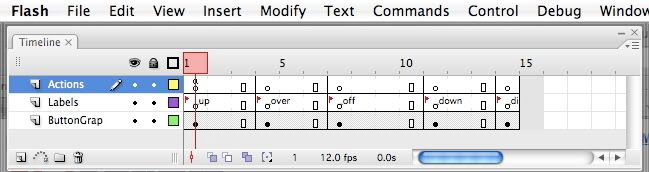
The actions layer you see above has this code attached to it:
The labels layer is just button states, the last one being "disabled."
The button graphics layer has two movie clips, one for the "over" and one for the "off." Within the movie clips are just basic graphics and text with motion tweens and alpha effects attached. The movie clips are "btn_rd_anim_in " and "btn_rd_anim_ou t."
Okay, now back to the main timeline. The actions layer mentioned above with the asterick.
My code is this:
***post continued in comment, for some reason would not let me continue here.**
First I'm going to say that I am really new to Actionscript. (As in, only been using for a few days new.) So please excuse me if I don't have the terminology down completely.
I am trying to create an interactive button where upon "rolling over" a certain movie clip is played, and upon "rolling out" another movie clip is played. I know, fairly simple, right?
After trying this by altering the the button's over state and having it not work, I read in a book that you can create movie clips that behave like buttons.
So I have done this. The clip-button is called "btn_red" In the main timeline, I have the layer with this button, and an actions layer.*
Within btn_red, I have this:
The actions layer you see above has this code attached to it:
Code:
stop();
buttonMode = true;
The button graphics layer has two movie clips, one for the "over" and one for the "off." Within the movie clips are just basic graphics and text with motion tweens and alpha effects attached. The movie clips are "btn_rd_anim_in " and "btn_rd_anim_ou t."
Okay, now back to the main timeline. The actions layer mentioned above with the asterick.
My code is this:
Code:
//disabled function
stop();
// code_hint comments
// MovieClip btn_red;

// event handlers
function handleClick( pEvent:MouseEvent ):void
{
	if( pEvent == btn_red )
	{
		//handle event
		btn_red.enabled = false;
		btn_red.gotoAndStop( "_Disabled" );
	}
}
// register events
btn_red.addEventListener( MouseEvent.CLICK. handleClick );

//over function
stop();
// code_hint comments
// MovieClip btn_red;

// event handlers
function handleROLL_OVER( pEvent:MouseEvent ):void
{
	if( pEvent == btn_rd )
	{
		//handle event
		btn_red.ROLL_OVER = true
		gotoAndPlay("_over")
	}
}
// register events
btn_red.addEventListener( MouseEvent.ROLL_OVER, handleRollOver );

//off function
stop();
// code_hint comments
// MovieClip btn_red;
function handleROLL_OUT( pEvent:MouseEvent ):void
{
	if( pEvent == btn_rd )
	{
		//handle event
		btn_red.ROLL_OUT == true
		gotoAndPlay("_off")
	}
}
// register events
btn_red.addEventListener( MouseEvent.ROLL_OUT, handleRollOut );
stop();


Comment