VB - modify shortcut target property

Collapse
X
 
  • Time
  • Show
Clear All
new posts
  • Goilla69
    New Member
    • Jul 2007
    • 5

    VB - modify shortcut target property

    Ok, really stupid question...
    lets say u want button 1 to do the following:
    You know wen u right click on a program and click properties and it looks like this:
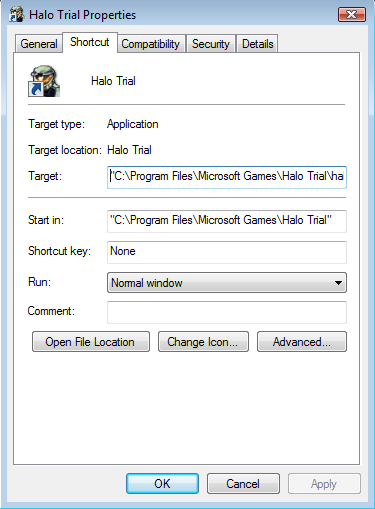

    well under target i wana rename from

    Code:
    "C:\Program Files\Microsoft Games\Halo Trial\halo.exe"
    to

    Code:
    "C:\Program Files\Microsoft Games\Halo Trial\halo.exe" -window
    i Have no idea how to do that...
    so plz help me out...
  • Goilla69
    New Member
    • Jul 2007
    • 5

    #2
    sorry 4 thge duble post, but some 1 plz answer

    Comment

    • Killer42
      Recognized Expert Expert
      • Oct 2006
      • 8429

      #3
      I can't see the screen shot, but are you saying that you want to change the properties of a shortcut?

      And what does this have to do with Visual Basic? Perhaps you should be asking in the Windows forum, or the Misc Questions forum.

      By the way, there's no point getting impatient. If someone reads you post and knows the answer, I'm sure they'll share it with you. Adding "please answer" messages is counter-productive, because lots of people will see on the list that the post already has a reply, and won't bother to read it. You need to use a bit of patience. This is a gathering of people spread all over the world, who are volunteering their own time, when they can spare it. So it can sometimes take a while to get an answer.

      Comment

      • Goilla69
        New Member
        • Jul 2007
        • 5

        #4
        Originally posted by Killer42
        I can't see the screen shot, but are you saying that you want to change the properties of a shortcut?

        And what does this have to do with Visual Basic? Perhaps you should be asking in the Windows forum, or the Misc Questions forum.

        By the way, there's no point getting impatient. If someone reads you post and knows the answer, I'm sure they'll share it with you. Adding "please answer" messages is counter-productive, because lots of people will see on the list that the post already has a reply, and won't bother to read it. You need to use a bit of patience. This is a gathering of people spread all over the world, who are volunteering their own time, when they can spare it. So it can sometimes take a while to get an answer.
        yea, sorry but it got bumped down to like the 8th topic, and no 1 had read it so i didnt know...
        about the screen shot. you can see it here:

        and i need to know wat to script to make a button do wat i wrote...

        Comment

        • Killer42
          Recognized Expert Expert
          • Oct 2006
          • 8429

          #5
          I found the following posted by username RobDog888 on VBWire VB Forums (shh... don't tell the boss).

          Quoting...

          I put this example together to demonstrate how to programmaticall y access a shortcut in the Program Files Start Menu. With variations of this code you can gain access to any property of a shortcut. I hope members enjoy this code and post replies of what you think of it.

          This demo will change the properties for Internet Explorer in your Start Menu > Program Files.
          Comments: the tooltip and comment description for the link.
          Arguments: it will add an argument to the shortcut target.
          ShowCommand: it will set the window show state to Maximized
          SetIconLocation: it will change the location of the icon to use and designate the icon index to use.
          Save: Saves the changes to the shortcut.
          InvokeVerb: runs the open command (optionally by uncommenting the line of code)
          [CODE=vb]Set oFolder = oShell.NameSpac e(ssfPROGRAMS)
          If (Not oFolder Is Nothing) Then
          Dim oFolderItem As Shell32.FolderI tem
          Set oFolderItem = oFolder.ParseNa me("Internet Explorer.lnk")
          If (Not oFolderItem Is Nothing) Then
          Dim oShellLink As ShellLinkObject
          Set oShellLink = oFolderItem.Get Link
          If (Not oShellLink Is Nothing) Then
          'Set the arguments for the ShellLinkObject
          oShellLink.Argu ments = "http://www.thescripts. com" ' Modified by Killer42 (obviously).
          oShellLink.Desc ription = "This text is added to the comments of the link programmaticall y."
          oShellLink.Show Command = 3
          oShellLink.SetI conLocation "C:\Windows\Sys tem32\SHELL32.d ll", 46 'Windows Update Icon
          oShellLink.Save
          'oFolderItem.In vokeVerb "open" 'Opens IE and navigates to VBF !
          End If
          Set oShellLink = Nothing
          End If
          Set oFolderItem = Nothing
          End If
          Set oFolder = Nothing
          Set oShell = Nothing

          End Sub[/CODE]

          Comment

          • Goilla69
            New Member
            • Jul 2007
            • 5

            #6
            ok thnx...
            it looks a lil complicated, but i will try to figure it out...
            and btw, the thing i wana edit is on desktop, just incase any 1 else has any easier ways

            Comment

            • Killer42
              Recognized Expert Expert
              • Oct 2006
              • 8429

              #7
              I think that lot will give you what you need to do it. But yeah, it may take a bit of fiddling to work it out. Sorry, I've been real busy or I'd check it out myself. Possibly at lunch time today... (just started work now).

              Comment

              • Goilla69
                New Member
                • Jul 2007
                • 5

                #8
                ok, thnx a lot... u've helped a lot...
                also srry agen for the double post...

                Comment

                • spikeyredcactus
                  New Member
                  • Dec 2007
                  • 4

                  #9
                  hi im fairly new to vb.
                  How would you do this in visual basic express 2008 .
                  it doesnt recognise ofolder, it says that its not declared.
                  it also doesnt recognise Shell32.FolderI tem and ShellLinkObject and oShell, for the same reason.
                  is it possible in the express edition?

                  Comment

                  • Killer42
                    Recognized Expert Expert
                    • Oct 2006
                    • 8429

                    #10
                    I've had a bit of a look at this just now, and discovered the following...
                    • In VB6 at least, you need to add a reference to "Microsoft Shell Controls and Automation" to your project. This probably still applies in VB 2008.
                    • It looks as though the following, or something similar, are missing from the sample I copied:
                      Dim oShell As Shell2.Shell ' (May need New keyword, I don't know.)
                      Dim oFolder As Shell32.Folder

                    Comment

                    • spikeyredcactus
                      New Member
                      • Dec 2007
                      • 4

                      #11
                      thanks for the help, but the 'Shell2.Shell' and 'Shell32.Folder ' are now underlined saying the same thing as before. What would be the new for these objects?

                      Dim oShell As Shell2.Shell ' (May need New keyword, I don't know.)
                      Dim oFolder As Shell32.Folder

                      ShellLinkObject , Shell32.FolderI tem are also underlined for the same reason

                      any ideas?

                      Comment

                      • Killer42
                        Recognized Expert Expert
                        • Oct 2006
                        • 8429

                        #12
                        I think you'll find the first point in my post answers these questions.

                        Comment

                        • spikeyredcactus
                          New Member
                          • Dec 2007
                          • 4

                          #13
                          sorry im a new at vb.
                          does anyone else have any ideas as to what these keywords might be in vb express? , if killer doesnt know?
                          ive had a look on msdn online but i cant find anything relevant

                          Comment

                          • spikeyredcactus
                            New Member
                            • Dec 2007
                            • 4

                            #14
                            how do i make a reference to the microsoft shell controlls and automation

                            Comment

                            • Killer42
                              Recognized Expert Expert
                              • Oct 2006
                              • 8429

                              #15
                              Originally posted by spikeyredcactus
                              how do i make a reference to the microsoft shell controlls and automation
                              The documentation should tell you how to add a reference to your project. When you get the list of available libraries, that will be one of them.

                              If anyone else does know the details of how to do so, now would be a good time to jump in. Sorry, I'm just an old VB6 programmer.

                              Comment

                              Working...