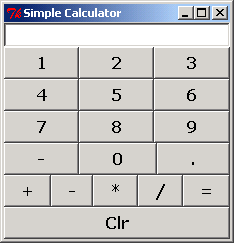
Calculator Explanation

Collapse
X
 
  • Time
  • Show
Clear All
new posts
  • Fadili
    New Member
    • Mar 2010
    • 6

    Calculator Explanation


    Code:
    from Tkinter import *
    
    def frame(root, side): 
        w = Frame(root)
        w.pack(side=side, expand=YES, fill=BOTH)
        return w
    
    def button(root, side, text, command=None): 
        w = Button(root, text=text, command=command) 
        w.pack(side=side, expand=YES, fill=BOTH)
        return w
    
    class Calculator(Frame):
        def __init__(self):
            Frame.__init__(self)
            self.option_add('*Font', 'Verdana 12 bold')
            self.pack(expand=YES, fill=BOTH)
            self.master.title('Simple Calculator')
            self.master.iconname("calc1")
    
            display = StringVar()
            Entry(self, relief=SUNKEN, textvariable=display).pack(side=TOP, expand=YES, fill=BOTH)
    
            for key in ("123", "456", "789", "-0."):
                keyF = frame(self, TOP)
                for char in key:
                    button(keyF, LEFT, char,
                           lambda w=display, c=char: w.set(w.get() + c))
    
            opsF = frame(self, TOP)
            for char in "+-*/=":
                if char == '=':
                    btn = button(opsF, LEFT, char)
                    btn.bind('<ButtonRelease-1>',
                             lambda e, s=self, w=display: s.calc(w), '+')
                else:
                    btn = button(opsF, LEFT, char,
                       lambda w=display, s=' %s '%char: w.set(w.get()+s))
    
            clearF = frame(self, BOTTOM)
            button(clearF, LEFT, 'Clr', lambda w=display: w.set(''))
    
        def calc(self, display):
            try:
                display.set('eval(display.get())')
            except:
                display.set("ERROR")
    
    if __name__ == '__main__':
        Calculator().mainloop()
    Who can explain the code? How are the buttons created?
    Thanks
    Last edited by bvdet; Mar 2 '10, 06:53 PM. Reason: Fixed indentation error
  • bvdet
    Recognized Expert Specialist
    • Oct 2006
    • 2851

    #2
    That's why I like to import the module instead of importing everything.
    Code:
    import Tkinter
    # or import Tkinter as Tk
    You may be able to see that the buttons are created with the call
    Code:
    w = Tkinter.Button(root, text=text, command=command)
    Then the pack geometry manager is called as a method of the widget to display the button.
    Code:
    w.pack(side=side, expand=YES, fill=BOTH)
    display is the variable shown in the Tkinter.Entry widget. The current value of the variable can be obtained with the get() method of Tkinter variables. The "=" button is bound to the calc() function which evaluates the current value of display and sets the variable to the result using the set() method of Tlinter variables.

    Comment

    • bvdet
      Recognized Expert Specialist
      • Oct 2006
      • 2851

      #3
      To display a calculated result, method calc() should look like this:
      Code:
          def calc(self, display):
              try:
                  display.set(str(eval(display.get())))
              except:
                  display.set("ERROR")

      Comment

      • Fadili
        New Member
        • Mar 2010
        • 6

        #4
        Thanks bvdet, very clearly explained

        Comment

        Working...