
PHP debugging

Collapse
This topic is closed.
X
X
 
  • Time
  • Show
Clear All
new posts
  • Virgil Green

    #61
    Re: PHP debugging


    "Andrew DeFaria" <Andrew@DeFaria .com> wrote in message
    news:e1ad2$4137 7630$c09cfcf$98 25@msgid.megane wsservers.com.. .
    [color=blue]
    > I said exactly what?[/color]

    Tim, being the OP, was erroneously attributed with "All you need is a good
    editor and a good debugger! They need not co-exist in the same window, they
    just need to be available."

    Tim claimed he had not made such a statement and that no one had in this
    thread. I determined that you had made the very statement (with which I
    agree) and so I posted that it had been stated in the thread and provided
    the proper attribution. Here is the full paragraph from your post of
    08/30/2004:

    "Nonsense. All you need is a good editor and a good debugger! They need not
    co-exist in the same window, they just need to be available - and good.
    Tools are indeed tools. As such they should be separate and focus on the
    issue of the problem they are designed to address. I don't have a
    hammer/screwdriver/axe/drill combo - I have separates. Each tool is good at
    what it was designed to do and these tools can be used together if need be."
    [color=blue]
    > If you're gonna go through the trouble of attributing a
    > statement to me (including spelling and capitalizing my
    > last name they way I like it) then at least actually copy
    > or refer to the quote directly. I"m not sure what "that"
    > really is in this context but I know I surely didn't say
    > anything akin to "you're a junior programmer if your
    > not using an IDE". I"m on the Non-IDE side anyway![/color]

    Since the post I made included the original quote attributed to the OP, and
    the OP stated that the quote was not his, I believe that the use of "that"
    was clearly referencing the mis-attributed remark. However, I have produced
    it here in better context. And, yes, I'd hate for someone to think you were
    responsible for the "junior programmer" remark!

    - Virgil

    Comment

    • Christian Fersch

      #62
      Re: PHP debugging

      Jasper Bryant-Greene wrote:[color=blue]
      > Andrew DeFaria wrote:[color=green][color=darkred]
      >>> Which IDE you would recommend? Perfer run on Linux.[/color][/color]
      > In Windows, Notepad.[/color]

      hahaha
      You "code" in notepad. I would really love to see you doing that.
      Capture a video and send it to me next time I'm bored. Will be a good laugh.
      Notepad - an editor, which is not able to open Linux textfiles, which
      has no sort of auto-intend, not to speak of line numbering or syntax
      highlight.
      That is not an editor, this is crap.

      I hope you were joking, or are you seriously "using" notepad?

      shocked greetings, Christian.

      Comment

      • Christian Fersch

        #63
        Re: PHP debugging

        Daniel Tryba wrote:[color=blue]
        > I tried Zend studio once, it' s debugger is great. The editor was IMHO
        > horrible. As long as there are no problems in code/server, a "simple
        > editor" is fasted, in the case of bugs in complex datasctructures a
        > decent debugger is needed. But there is absolutly no need to have them
        > integrated.
        >
        > But enlighten me, what IDE (for PHP) should I take a look at?[/color]

        I share your opinion, that Zend studios is a horrible, overloaded
        editor. Impossible to code with that crap.

        Take a look a nusphere phpEd. It's fast and has everything you need. But
        you have to say, that you have to give it about an hour to get used to
        it's handling of projects and its workspace-feature. Seems strange at
        the beginning, but really great features once you got used to them.

        greetings, Christian.

        Comment

        • Christian Fersch

          #64
          Re: PHP debugging

          Tony Marston wrote:[color=blue]
          > I develop on Windows, not Linux, so I use PHPEdit from
          > http://www.waterproof.fr/[/color]

          holy shit - this editor is fucking overloaded, slow and unusable.
          I have an AMD64-3200 machine witch 1gb ram here and phpEdit was still slow.

          Comment

          • Tim Tyler

            #65
            Re: PHP debugging

            Colin McKinnon <colin.deleteth is@andthis.mms3 .com> wrote or quoted:
            [color=blue]
            > WRT the OP's questions:
            >
            > http://uk.php.net/manual/en/function...or-handler.php
            > http://uk.php.net/manual/en/function...-reporting.php
            > http://uk.php.net/manual/en/function...-backtrace.php[/color]

            Useful - thanks. I wound up writing my own error handler - and it
            seems to work OK.
            [color=blue]
            > You might also find the lint option useful
            > (http://uk.php.net/manual/en/features.commandline.php) although it's only a
            > static check of the current file.[/color]

            I've been using that. It's useful - but hardly qualifies as much of a
            lint tool in my book.

            I'd welcome proper lint and formatting tools for PHP - but haven't yet
            found anything very useful in those departments.
            --
            __________
            |im |yler http://timtyler.org/ tim@tt1lock.org Remove lock to reply.

            Comment

            • Christian Fersch

              #66
              Re: PHP debugging

              Andrew DeFaria wrote:[color=blue]
              > I'm struggling to understand why my name appears here. I did not say
              > "Which IDE you would recommend? Perfer run on Linux" nor did I say "In
              > Windows, Notepad" (Actually in Windows I use XEmacs...). As such, why is
              > my name appearing?[/color]

              sry, quoting mistake
              [color=blue][color=green]
              >> Notepad - an editor, which is not able to open Linux textfiles,[/color]
              >
              > Hmmmm... Sorry, but I've actually used Notepad to open Linux textfiles.
              > It works. Looks funny but it works![/color]

              Of course it "works"
              But you can't do anything with that crap you just opened.
              [color=blue][color=green]
              >> not to speak of line numbering or syntax highlight.[/color]
              >
              > While I agree that syntax highlighting is cool and indeed useful do you
              > realize how much good code has been writing before it's advent?[/color]

              Well, do you realize how many houses have been build before the crane
              was invented?
              That's not an argument.
              [color=blue][color=green]
              >> That is not an editor, this is crap.[/color]
              >
              > It is an editor. It's not a good editor. It's not an editor for
              > programming, though it can be used as such.[/color]

              Of course it can but it will bring your productivity down to somewhere
              at 20%.

              [color=blue][color=green]
              >> I hope you were joking, or are you seriously "using" notepad?[/color]
              >
              > Hell I use notepad too - when I have to! As a contractor often you have
              > to deal with environments where they don't want you installing anything
              > and all you're left with is what comes default.[/color]

              Yeah, there may always be a case where you may need to use notepad. But
              that's not point - Jasper Bryant said, that notepad was his editor of
              choice.

              greetings, Christian

              Comment

              • Christian Fersch

                #67
                Re: PHP debugging

                Andrew DeFaria wrote:[color=blue]
                > You see this is another point. I don't want a PHPEdit or Zend or
                > nusphere phpEd IDE etc. I don't only code in PHP. I code in PHP, Perl,
                > bash, awk, sed, html, xml, etc, etc. I want one editor, one set of
                > keystrokes and concepts that dynamically adapts to what I'm doing and
                > uses the appropriate mode in the appropriate look and feel so that the
                > only thing really changing behind me is the language, not my
                > editor/environment, not the whole IDE and not state of the world, one
                > for each language such as the IDE per language approach! If PHPEdit is
                > overloaded and slow then what would using PHPEdit for php, some Perl IDE
                > for Perl, an IDE for bash scripting, awk scripting, html editor suite do
                > to a poor little machine?!? Let alone the confusion! That's why I use
                > XEmacs.[/color]

                You can replace PHPEdit with 20 other tools and your pc will still be
                faster. believe me - this program doesn't even react to keystrokes
                immediately.
                I prefer using nusphere phpEd for php and ultraEdit for the rest. I once
                used only ultraEdit for much worse than a ide missing features is a
                totally overloaded ide. But I just found out, that I'm a lot faster in
                coding, by using phpEd in addition to UltraEdit. So I would propose you
                to use phpEd for php and pearl and ultraEdit for the rest (phpEd is also
                able to edit html, but for html you don't need any ide-features, and
                ultraEdit is just the much more powerful text-editor). Your poor machine
                should survive 2 programs and when using phpEd you don't need a browser
                for the docs, so you save 1 program again.
                Of course I understand what's your point, but you can trust me in that
                you should really take a look at phpEd. You won't give it away anymore
                after you used it once.

                greetings, Christian

                Comment

                • Andrew DeFaria

                  #68
                  Re: PHP debugging

                  Christian Fersch wrote:
                  [color=blue][color=green][color=darkred]
                  >>> Notepad - an editor, which is not able to open Linux textfiles,[/color]
                  >>
                  >> Hmmmm... Sorry, but I've actually used Notepad to open Linux
                  >> textfiles. It works. Looks funny but it works![/color]
                  >
                  > Of course it "works" But you can't do anything with that crap you
                  > just opened.[/color]

                  Maybe you can't but I can. Granted it's not easy nor a productive
                  environment (nor is it my first choice) but you *can *do editing in it.
                  [color=blue][color=green][color=darkred]
                  >>> not to speak of line numbering or syntax highlight.[/color]
                  >>
                  >> While I agree that syntax highlighting is cool and indeed useful do
                  >> you realize how much good code has been writing before it's advent?[/color]
                  >
                  > Well, do you realize how many houses have been build before the crane
                  > was invented? That's not an argument.[/color]

                  It's not an argument - it's simply a statement. Think of it as giving
                  credit or paying homage. Given a choice I would choose syntax
                  highlighting over no highlighting all other things being equal...
                  [color=blue][color=green][color=darkred]
                  >>> That is not an editor, this is crap.[/color]
                  >>
                  >> It is an editor. It's not a good editor. It's not an editor for
                  >> programming, though it can be used as such.[/color]
                  >
                  > Of course it can but it will bring your productivity down to somewhere
                  > at 20%.[/color]

                  Granted but that flies in the face of your earlier statement of "But you
                  _can't do anything_ with that crap you just opened".
                  [color=blue][color=green][color=darkred]
                  >>> I hope you were joking, or are you seriously "using" notepad?[/color]
                  >>
                  >> Hell I use notepad too - when I have to! As a contractor often you
                  >> have to deal with environments where they don't want you installing
                  >> anything and all you're left with is what comes default.[/color]
                  >
                  > Yeah, there may always be a case where you may need to use notepad.
                  > But that's not point - Jasper Bryant said, that notepad was his editor
                  > of choice.[/color]

                  Well I, like you apparently, think that that is Jasper's problem! :-)

                  When people say "an editor is an editor" my favorite retort does not
                  pick on notepad (which is an editor of little power but is capible
                  nonetheless) rather I say "well hell cat(1) can be an editor too. Just
                  cat > myfile.c and make sure you type it in correctly this time! However
                  some of us want an editor with slightly more power...". :-)
                  --
                  24 hours in a day...24 beers in a case...coincide nce?

                  Comment

                  • Andrew DeFaria

                    #69
                    Re: PHP debugging

                    Christian Fersch wrote:
                    [color=blue]
                    > Andrew DeFaria wrote:
                    >[color=green]
                    >> You see this is another point. I don't want a PHPEdit or Zend or
                    >> nusphere phpEd IDE etc. I don't only code in PHP. I code in PHP,
                    >> Perl, bash, awk, sed, html, xml, etc, etc. I want one editor, one set
                    >> of keystrokes and concepts that dynamically adapts to what I'm doing
                    >> and uses the appropriate mode in the appropriate look and feel so
                    >> that the only thing really changing behind me is the language, not my
                    >> editor/environment, not the whole IDE and not state of the world, one
                    >> for each language such as the IDE per language approach! If PHPEdit
                    >> is overloaded and slow then what would using PHPEdit for php, some
                    >> Perl IDE for Perl, an IDE for bash scripting, awk scripting, html
                    >> editor suite do to a poor little machine?!? Let alone the confusion!
                    >> That's why I use XEmacs.[/color]
                    >
                    > You can replace PHPEdit with 20 other tools and your pc will still be
                    > faster. believe me - this program doesn't even react to keystrokes
                    > immediately.[/color]

                    See that's the point. I don't need PHPEdit and/or 20 other tools to try
                    to solve this problem. XEmacs will already handles it.
                    [color=blue]
                    > I prefer using nusphere phpEd for php and ultraEdit for the rest.[/color]

                    Question: Why not just use ultraEdit for all? IOW what makes PHP special?
                    [color=blue]
                    > I once used only ultraEdit for much worse than a ide missing features
                    > is a totally overloaded ide. But I just found out, that I'm a lot
                    > faster in coding, by using phpEd in addition to UltraEdit.[/color]

                    Then wouldn't you be likewise much faster coding your Perl in a Perl
                    IDE, your TCL in a TCL IDE, your sh scripts in a SH IDE, etc?
                    [color=blue]
                    > So I would propose you to use phpEd for php and pearl[/color]

                    What's pearl? Do you mean Perl? Perl's a language not an IDE.
                    [color=blue]
                    > and ultraEdit for the rest (phpEd is also able to edit html, but for
                    > html you don't need any ide-features, and ultraEdit is just the much
                    > more powerful text-editor).[/color]

                    I prefer XEmacs for editing text of any kind. This includes PHP, Perl,
                    html, etc.
                    [color=blue]
                    > Your poor machine should survive 2 programs and when using phpEd you
                    > don't need a browser for the docs, so you save 1 program again.[/color]

                    I'm not worried about *my* poor machine (well actually I am as it's a
                    450 MHz, 6 year old jobber) rather what I'm saying is that across all of
                    these various IDEs that one could use they all do one basic thing - edit
                    source files which are ultimately text files. I've got a good editor
                    that does that. And I do not want to install, learn, maintain 6 IDEs for
                    6 languages when one good editor will suffice. That's the point that I
                    was making. And yes it's my preference and no I'm not claiming it makes
                    me a better programmer.
                    [color=blue]
                    > Of course I understand what's your point, but you can trust me in that
                    > you should really take a look at phpEd. You won't give it away anymore
                    > after you used it once.[/color]

                    Perhaps but quite honestly I don't write a ton of PHP. I've written
                    some. It's an interesting language and I think it's quite useful and as
                    such I've incorporated it into my web site. However this is all home
                    stuff. I don't have a current assignment writing PHP. Actually lately
                    I've been writing Visual Basic Script much to my own chagrin and yes I
                    simply loaded the visual-basic-mode.el in XEmacs and away I went. I have
                    Visual Studio installed here at work but quite frankly I cannot be
                    bothered to take the who knows how long it would take me to learn that
                    IDE! And besides, if I ever decide to utilize some Visual Basic Script
                    at home you can bet your sweet bippie I'm not gonna plunk down a couple
                    of hundred dollars for Visual Studio!

                    --
                    Help Wanted: Telepath. You know where to apply.

                    Comment

                    • Chris Hope

                      #70
                      Re: PHP debugging

                      Tim Tyler wrote:
                      [color=blue][color=green]
                      >> WRT the OP's questions:
                      >>
                      >> http://uk.php.net/manual/en/function...or-handler.php
                      >> http://uk.php.net/manual/en/function...-reporting.php
                      >> http://uk.php.net/manual/en/function...-backtrace.php[/color]
                      >
                      > Useful - thanks.  I wound up writing my own error handler - and it
                      > seems to work OK.[/color]

                      BTW, debug_backtrace () is only available from 4.3.0 and on. If you're going
                      to be implementing your projects on servers that have older versions ofPHP
                      then you won't be able to use it.

                      --
                      Chris Hope - The Electric Toolbox - http://www.electrictoolbox.com/

                      Comment

                      • Tim Tyler

                        #71
                        Re: PHP debugging

                        Chris Hope <blackhole@elec trictoolbox.com > wrote or quoted:
                        [color=blue]
                        > BTW, debug_backtrace () is only available from 4.3.0 and on. If you're going
                        > to be implementing your projects on servers that have older versions of PHP
                        > then you won't be able to use it.[/color]

                        Fortunately, that probably isn't much of an issue - but thanks for
                        pointing it out.

                        I'm sure PHP can be made to fail gracefully in this case - if need be.

                        Of course - none of my deployed programs ever produce error messages at
                        the level of PHP anyway ;-)
                        --
                        __________
                        |im |yler http://timtyler.org/ tim@tt1lock.org Remove lock to reply.

                        Comment

                        • Christian Fersch

                          #72
                          Re: PHP debugging

                          Andrew DeFaria wrote:[color=blue]
                          > When people say "an editor is an editor" my favorite retort does not
                          > pick on notepad (which is an editor of little power but is capible
                          > nonetheless) rather I say "well hell cat(1) can be an editor too. Just
                          > cat > myfile.c and make sure you type it in correctly this time! However
                          > some of us want an editor with slightly more power...". :-)[/color]

                          agreed :)

                          Comment

                          • Christian Fersch

                            #73
                            Re: PHP debugging

                            Andrew DeFaria wrote:[color=blue][color=green]
                            >> I prefer using nusphere phpEd for php and ultraEdit for the rest.[/color]
                            > Question: Why not just use ultraEdit for all? IOW what makes PHP special?[/color]

                            I'll tell ya: Php is a lot more complex than the others and for example
                            I can't remember all the function parameters. In ultraedit this needs me
                            to select the function name, press my hotkey and so I open a browser
                            window in which I can see the parameters. But if it's a self-written
                            function included from another file, I will have to switch to that file
                            (or maybe open in first) and have to look there for the parameters.
                            And now the power of phpEd: I don't stop coding a second, just press
                            shift+ctrl+spac e and this is what comes up:

                            (I'm speaking of the tooltip, not code-completing)
                            It recognizes costum classes and functions included/required from other
                            files. Simply everything. And it even has support for phpDoc -> If I
                            documented my function, I will see it in that tooltip.

                            If I need the name of a database-column, I would have to switch to
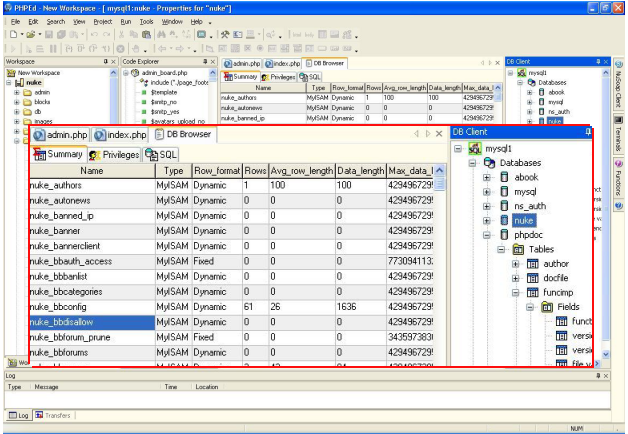
                            phpMyAdmin and look there. In phpEd I have one click and I see my
                            database structure on the right and I can even drag'n'drop the column
                            and table names.
                            [color=blue][color=green]
                            >> I once used only ultraEdit for much worse than a ide missing features
                            >> is a totally overloaded ide. But I just found out, that I'm a lot
                            >> faster in coding, by using phpEd in addition to UltraEdit.[/color]
                            >
                            > Then wouldn't you be likewise much faster coding your Perl in a Perl
                            > IDE, your TCL in a TCL IDE, your sh scripts in a SH IDE, etc?[/color]

                            I don't know TCL, but I'm sure I don't need a sh script IDE. That's not
                            complex enough.
                            I write my code with phpEd at home, but at work I write it with
                            ultraEdit (I'm the only one writing php there, having my own project and
                            my boss went crazy when I showed the 500$ phpEd-license ;). And I just
                            feel the difference. Coding in phpEd is a lot faster and easier.

                            [color=blue][color=green]
                            >> So I would propose you to use phpEd for php and pearl[/color]
                            >
                            > What's pearl? Do you mean Perl? Perl's a language not an IDE.[/color]

                            I know - phpEd also supports Pearl

                            [color=blue][color=green]
                            >> and ultraEdit for the rest (phpEd is also able to edit html, but for
                            >> html you don't need any ide-features, and ultraEdit is just the much
                            >> more powerful text-editor).[/color]
                            >
                            > I prefer XEmacs for editing text of any kind. This includes PHP, Perl,
                            > html, etc.[/color]

                            You should try UltraEdit - I haven't tried XEmacs yet, but it just can't
                            be as powerful as ultraEdit :)

                            [color=blue]
                            > and no I'm not claiming it makes me a better programmer.[/color]

                            Who would claim such a bullshit?
                            Even a little child would understand, that it's the result and the used
                            time that makes a good programmer, not the way the code was written.

                            [color=blue]
                            > Perhaps but quite honestly I don't write a ton of PHP. I've written
                            > some. It's an interesting language and I think it's quite useful and as
                            > such I've incorporated it into my web site. However this is all home
                            > stuff. I don't have a current assignment writing PHP.[/color]

                            Well, if you don't write a lot of php, there is of course no use in
                            getting used to an special IDE just for that language. That's not worth
                            the time. But I'm working with it a lot, having written a cms and an
                            user helpdesk. Getting used to an IDE for a language you don't actually
                            work with is of course silly and a waste of time.


                            greetings, Christian

                            Comment

                            • Christian Fersch

                              #74
                              Re: PHP debugging

                              Tim Tyler wrote:[color=blue]
                              > Of course - none of my deployed programs ever produce error messages at
                              > the level of PHP anyway ;-)[/color]

                              Yeah, no need for debugging functions on a production server.

                              Comment

                              • Andrew DeFaria

                                #75
                                Re: PHP debugging

                                Christian Fersch wrote:
                                [color=blue]
                                > Andrew DeFaria wrote:
                                >[color=green][color=darkred]
                                >>> I prefer using nusphere phpEd for php and ultraEdit for the rest.[/color]
                                >>
                                >> Question: Why not just use ultraEdit for all? IOW what makes PHP
                                >> special?[/color]
                                >
                                > I'll tell ya: Php is a lot more complex than the others and for
                                > example I can't remember all the function parameters. In ultraedit
                                > this needs me to select the function name, press my hotkey and so I
                                > open a browser window in which I can see the parameters.[/color]

                                I don't find PHP any more complicated than any other language that
                                supports a lot of functions such as say Perl. Personally I have an
                                editor up and I have a browser up at http://php.net. When I want to know
                                what a function does I simply type the function name into the search in
                                php.net and hit enter. No biggie.
                                [color=blue]
                                > But if it's a self-written function included from another file, I will
                                > have to switch to that file (or maybe open in first) and have to look
                                > there for the parameters. And now the power of phpEd: I don't stop
                                > coding a second, just press shift+ctrl+spac e and this is what comes
                                > up: http://www.nusphere.com/graphics/phpscreen_4_big.png (I'm speaking
                                > of the tooltip, not code-completing) It recognizes costum classes and
                                > functions included/required from other files. Simply everything. And
                                > it even has support for phpDoc -> If I documented my function, I will
                                > see it in that tooltip.
                                >
                                > If I need the name of a database-column, I would have to switch to
                                > phpMyAdmin and look there. In phpEd I have one click and I see my
                                > database structure on the right and I can even drag'n'drop the column
                                > and table names.[/color]

                                I don't find switching something that is that difficult nor do I think
                                that the nicety of not having to switch worth spending months learning a
                                totally new environment. YMMV.

                                In any event I would think that the same advantages you describe here
                                would exist for other languages such a Perl, shell scripting, awk, etc.
                                By your argument above one should have an IDE for each. Way too much
                                learning time in my book...
                                [color=blue][color=green][color=darkred]
                                >>> I once used only ultraEdit for much worse than a ide missing
                                >>> features is a totally overloaded ide. But I just found out, that I'm
                                >>> a lot faster in coding, by using phpEd in addition to UltraEdit.[/color]
                                >>
                                >> Then wouldn't you be likewise much faster coding your Perl in a Perl
                                >> IDE, your TCL in a TCL IDE, your sh scripts in a SH IDE, etc?[/color]
                                >
                                > I don't know TCL, but I'm sure I don't need a sh script IDE. That's
                                > not complex enough.[/color]

                                Shell scripts can and do get pretty complex and an IDE could benefit
                                from an IDE that assist the programmer. But I agree with you - I don't
                                need an IDE for shell scripts, just like I don't need an IDE for PHP.
                                [color=blue]
                                > I write my code with phpEd at home, but at work I write it with
                                > ultraEdit (I'm the only one writing php there, having my own project
                                > and my boss went crazy when I showed the 500$ phpEd-license ;). And I
                                > just feel the difference. Coding in phpEd is a lot faster and easier.[/color]

                                Exactly! $500 for a program?!? On my budget? I don't think so. Did you
                                actually shell out $500 for this program? All for the niceties of being
                                able to hover over a function name to see it's parameters? (I know there
                                are probably other niceties) Well I know that would not justify that
                                cost to me. Again YMMV but me I'll simply bring up another buffer in
                                XEmacs and read the function prototype or use a browser on php.net and
                                save the $500!
                                [color=blue][color=green][color=darkred]
                                >>> So I would propose you to use phpEd for php and pearl[/color]
                                >>
                                >> What's pearl? Do you mean Perl? Perl's a language not an IDE.[/color]
                                >
                                > I know - phpEd also supports Pearl[/color]

                                OK, I would have thought that that was a typo but you either typed again
                                or Pearl is something different so again I ask What's Pearl?
                                [color=blue][color=green][color=darkred]
                                >>> and ultraEdit for the rest (phpEd is also able to edit html, but for
                                >>> html you don't need any ide-features, and ultraEdit is just the much
                                >>> more powerful text-editor).[/color]
                                >>
                                >> I prefer XEmacs for editing text of any kind. This includes PHP,
                                >> Perl, html, etc.[/color]
                                >
                                > You should try UltraEdit - I haven't tried XEmacs yet, but it just
                                > can't be as powerful as ultraEdit :)[/color]

                                Depends on your definition of "power" I guess. Looked over the features
                                briefly and as far as I'm concerned XEmacs does all that already anyway
                                (at least the parts that I care about). Don't see the need of investing
                                a significant amount of time learning a new editor when about all I'd
                                get in addition is prettiness.
                                [color=blue][color=green]
                                >> and no I'm not claiming it makes me a better programmer.[/color]
                                >
                                > Who would claim such a bullshit?[/color]

                                People here have been trying :-)
                                [color=blue]
                                > Even a little child would understand, that it's the result and the
                                > used time that makes a good programmer, not the way the code was written.
                                >[color=green]
                                >> Perhaps but quite honestly I don't write a ton of PHP. I've written
                                >> some. It's an interesting language and I think it's quite useful and
                                >> as such I've incorporated it into my web site. However this is all
                                >> home stuff. I don't have a current assignment writing PHP.[/color]
                                >
                                > Well, if you don't write a lot of php, there is of course no use in
                                > getting used to an special IDE just for that language. That's not
                                > worth the time. But I'm working with it a lot, having written a cms
                                > and an user helpdesk. Getting used to an IDE for a language you don't
                                > actually work with is of course silly and a waste of time.[/color]

                                I guess my points are:

                                1. I work in many languages
                                2. XEmacs handles them all
                                3. I don't need kitchen sink IDEs and I prefer using a set of tools
                                each specialized in doing one job well.
                                4. Don't need fancy eye candy to program
                                5. Don't want to have to spend my programming time learning IDEs
                                rather I want to learn the language and it's functionality.
                                6. I don't have a budget for spending tons of $$$ on IDEs


                                --
                                Reality is a crutch for people who can't handle drugs.


                                Comment

                                Working...