Nested if() statements...Grade range...

Collapse
X
 
  • Time
  • Show
Clear All
new posts
  • tiktik
    New Member
    • Nov 2008
    • 14

    Nested if() statements...Grade range...

    Hi...

    I am doing this simple Java program which displays a particular grade (A, B, C...) according to the mark entered.

    However I cannot arrange it in such a way that it displays "Invalid" if the user eners a grade > 100... take a look...


    Code:
    System.out.print ("Enter mark: ");
    	int mark = Keyboard.readInt();
    	char grade =' ';
    		
    	
    	if (mark > 100) (System.out.println ("Invalid Entry"));
    	  else if (mark >=80 && mark <= 100) grade = 'A';
    	     else if (mark >= 60) grade = 'B';
    		      else if (mark >= 55) grade = 'C';
    		  	 	  else if (mark >= 40) grade = 'D'; 
    		  	 	  	   else if (mark < 40) grade = 'F';
    		  	 	  	        
    			 	  	   
    		System.out.println ("Grade = " + grade);
    after compiled it keeps telling me that this is not a statement:

    if (mark > 100) (System.out.pri ntln ("Invalid Entry"));


    can't figure why ..


    The program however runs, and if the user enters "101" for exmple, it keeps obeying the second 'else if'....

    Any ideas pls....?

    thanks
  • Nepomuk
    Recognized Expert Specialist
    • Aug 2007
    • 3111

    #2
    Originally posted by tiktik
    after compiled it keeps telling me that this is not a statement:

    if (mark > 100) (System.out.pri ntln ("Invalid Entry"));
    It's right, that isn't a statement. Try
    Code:
    if (mark > 100) System.out.println ("Invalid Entry");
    or
    Code:
    if (mark > 100) {System.out.println ("Invalid Entry");}
    instead.

    Greetings,
    Nepomuk

    Comment

    • tiktik
      New Member
      • Nov 2008
      • 14

      #3
      Yes that's it thanks a lot...

      but now i have another problem...

      i would like that if the entry is invalid, it would not display the last line ("Grade =" ), and so i tried to insert the 'break;' but it seems as if it can be used only in loops or switch :(


      Code:
       public static void main(String[] args) {
          
          System.out.print ("Enter mark: ");
      	int mark = Keyboard.readInt();
      	char grade =' ';
      		
      	
      	if (mark > 100) System.out.println ("Invalid Entry"); 
      		break;
      	   if (mark >=80 && mark <= 100) grade = 'A';
      	     else if (mark >= 60) grade = 'B';
      		      else if (mark >= 55) grade = 'C';
      		  	 	  else if (mark >= 40) grade = 'D'; 
      		  	 	  	   else if (mark < 40) grade = 'F';
      		  	 	  	        
      			 	  	   
      		System.out.println ("Grade = " + grade);

      when I run this program and input an invalid entry, it still displays "Grade = " at the end...

      Comment

      • tiktik
        New Member
        • Nov 2008
        • 14

        #4
        Never mind.... i solved the problem by inserting "System.out.pri ntln" after every if statement like this

        Code:
         public static void main(String[] args) {
            
            System.out.print ("Enter mark: ");
        	int mark = Keyboard.readInt();
        	char grade =' ';
        		
        	
        	if (mark > 100) System.out.println ("Invalid Entry"); 
        	   else if (mark >=80 && mark <= 100) {grade = 'A';
        	                                       System.out.println ("Grade = " + grade); }
        	   
        	      else if (mark >= 60) {grade = 'B';
                                        System.out.println ("Grade = " + grade); }
        	           
        		      else if (mark >= 55) {grade = 'C';
        		                           	System.out.println ("Grade = " + grade); }
        		      
        		  	 	  else if (mark >= 40) {grade = 'D'; 
        		  	 	  	                 	System.out.println ("Grade = " + grade); }
        		  	 	  	  
        		  	 	  	   else if (mark < 40) {grade = 'F';
        		  	 	  	        	            System.out.println ("Grade = " + grade);}

        Now the program works as it is supposed... but still I have the question question whether or not the 'break;' could be used elsewhere (not just in loops or switch() )?... It would be very useful I think - especially when one needs to terminate the program if a certain value is entered - one needs something which would get him out of the main() block...

        Thanks

        Comment

        • JosAH
          Recognized Expert MVP
          • Mar 2007
          • 11453

          #5
          This is just programming: if a valid numbers was entered you want to do something, otherwise you don't want to do anything, so:

          Code:
          if (valid number entered) {
             do something;
          }
          Let's concentrate on the 'valid number entered'; the boolean expression
          'number <= 100 && number >= 0' seems to express what you want. Simply plug it into your pseudo code:

          Code:
          if (number <= 100 && number >= 0) {
             do something;
          }
          You already have solved the 'do something' part so plug it into the pseudo code.

          kind regards,

          Jos

          Comment

          • tiktik
            New Member
            • Nov 2008
            • 14

            #6
            Yes, thanks for your reply...it works very well with it as well

            Any idea about the break; question?

            Comment

            • JosAH
              Recognized Expert MVP
              • Mar 2007
              • 11453

              #7
              Originally posted by tiktik
              Yes, thanks for your reply...it works very well with it as well

              Any idea about the break; question?
              As you have already noticed a 'break' statement can only occur in a loop or in a case statement.

              kind regards,

              Jos

              Comment

              • Nepomuk
                Recognized Expert Specialist
                • Aug 2007
                • 3111

                #8
                Originally posted by tiktik
                Any idea about the break; question?
                There's always System.exit(int Status) if you really want to leave your program, but that should be used with caution.

                Other than that, you can always check if your grade variable has been assigned yet - setting it to a default value (e.g. 'X') would be one way of doing that. Or you can have a boolean value gradeWasSet. Or you can put all of those things in one nested if. Or I'm sure you can think of something else.

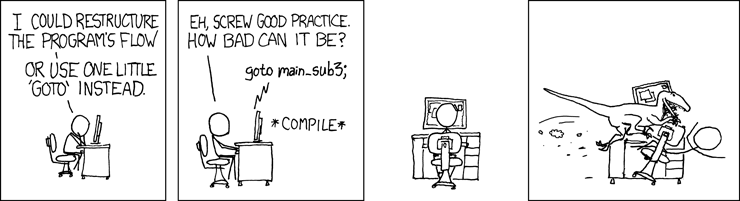
                There is something similar to what you mean in many languages: the jump command goto. This command doesn't exist in Java (although there is continue, which is similar in some aspects), as it can make code very ugly very easily. That's also why it's seen as bad style by a great part of the programming world.

                Here, I'll even give you a comic about goto:

                (from http://xkcd.com/292/)

                Greetings,
                Nepomuk

                Comment

                • tiktik
                  New Member
                  • Nov 2008
                  • 14

                  #9
                  Thanks for the detailed explanation.
                  good comic as well =)

                  tiktik

                  Comment

                  • Nepomuk
                    Recognized Expert Specialist
                    • Aug 2007
                    • 3111

                    #10
                    You're welcome of course. :-)

                    Greetings,
                    Nepomuk

                    Comment

                    Working...