Linker error undefined function Plzzz solve it

Collapse
X
 
  • Time
  • Show
Clear All
new posts
  • Suryaa Jha
    New Member
    • Apr 2015
    • 4

    Linker error undefined function Plzzz solve it

    i use turbo c++ v3.0.
    i tried to create a library and add the following
    functions to it.
    int prime(int);
    long fact(long);
    i used the standard procedure for doing so.
    yet when i tried to use my functions after
    including the header file i had created, a linker
    error occured.
    linker error : undefined symbol fact(long) in
    module noname00.cpp.
    now i had used 'int' in my program which means
    that it had identified the function in my library, yet
    it refused to work.
    is it because my compiler is outdated or because
    of some other flaw in the program.
    for the record i had applied the procedure as
    stated in yashwant kanetkar's book 'Let Us C'.
    please advise on how to correctly create a user
    defined library.
    plzzz show with a example
  • weaknessforcats
    Recognized Expert Expert
    • Mar 2007
    • 9214

    #2
    Is this a static or dynamic library? That is, is it a .lib or a dll?

    If it is a .lib, have you added the library name to the build of your program? The library name needs to be there as a linker resource.

    Comment

    • Suryaa Jha
      New Member
      • Apr 2015
      • 4

      #3
      no I have not added
      I just added the filename , but this is a file inclusion example but I want to do by library method
      In the header section I typed
      #include<studio .h>
      #include<conio. h>
      #include "filename.h "

      Comment

      • Suryaa Jha
        New Member
        • Apr 2015
        • 4

        #4
        Sir please give all syntaxes with any name as a example
        I m really confused plzz help me

        Comment

        • Suryaa Jha
          New Member
          • Apr 2015
          • 4

          #5
          How to add Library file name in the program
          I typed #include "func.lib"
          but it was reported as error as cannot open the specified file
          so what to do

          Comment

          • kiseitai2
            New Member
            • Jul 2007
            • 93

            #6
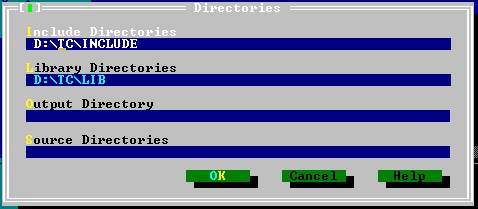
            I don't know the specifics of the IDE you are using. However, regardless of whether func.lib is a static library or an implementation library, there has to be a place in the linker's settings for adding the location on disk (path) of the func.lib file. Furthermore, there has to be another setting for specifying linker flags or linker include libraries. You will type func in this setting (I know you do not need to specify the .lib part for gcc). Often times, the linker settings are found bundled with the compiler settings in many IDEs. I would appreciate it if someone posts the specific instructions for turbo c++. Alternatively, you can create a small Makefile for your project that includes the LDFLAG and feed it to gcc through make.

            Why is it that you are experiencing this issue? Well, the #include directive is only used for header files. The way the traditional compilation process work is that you write some code, let's say in test.cc. Then, you feed this code file to a compiler, such as g++. The compiler doesn't need to know whether func.lib exists. Instead, it just needs to know the type return by the function you invoke and the number of arguments and their types in such function. At this stage, the compiler finds this information in func.h, which is the header file where you declared int prime(int) and long fact(long). The compiler spews out the machine-code representation of what you wrote and calls the linker. The linker is a program that works like a sort of book assembler. Each machine-code representation (.o, .obj, .lib, and .a files) are similar to book chapters. The linker starts sticking the code you wrote(which is now in the form of .o) together in order to produce the book called YourProgram (which is of the form .exe if working in a Windows environment). However, once in a while, it will find references to chapters you did not wrote or you wrote separately (func.lib) and it won't know what to do. If you specified the filepath to func.lib in your settings, it will be the same as if you told the linker, "Look, the chapter of the book you are desperately looking for is in this other book. Please, make a copy of it and stick it into the book you are currently assembling!" That's what the compiler does. Its product is the working program you can then run! I hope this analogy clarifies the process and gives you a hint as to what you must find in the compiler's/ linker's setting feature of your IDE. Maybe, try googling for "turbo c++ linker settings menu"? Cheers!

            P.S. I forgot to say that the #include directive actually tells the compiler to call another program that searches for the header file (technically speaking a text file) you specify and copy and paste it on your source code (noname00.cpp?) . This is the same program that later edits the cpp file by interpreting other directives like #ifdef #endif macro blocks!
            Last edited by kiseitai2; May 18 '15, 09:34 PM. Reason: Small technical clarification.

            Comment

            • kiseitai2
              New Member
              • Jul 2007
              • 93

              #7
              I did some quick googling of the documentation. I posted a link that is the closest thing I could find to the library path I was discussing above, but I actually don't feel comfortable with the UI shown in the screenshots I saw. Maybe, I have been pampered too much by Visual Studio, Code::Blocks, the Unix shells, and gcc.


              The following link says you have to add the library to the project as well. Maybe you know what it refers to?


              If you are just starting to learn C++ and there are no special circumstances that forces you to use one compiler over another, I recommend you try gcc instead (Visual C++ is also good). I don't like the fact that I can't find ready made and in-depth documentation for Turbo C++. GCC has the advantage that you can start learning from either the shell, which is a great skill to have under your belt, or with an IDE (the IDE can range from something like emacs, vim, and the sort to something like Code::Blocks and VS). Well, the moderators can tell me if I am out of place for making this suggestion. Cheers!

              Comment

              Working...