Form Reference on Update Query Not Working

Collapse
X
 
  • Time
  • Show
Clear All
new posts
  • Exiis
    New Member
    • Feb 2021
    • 4

    Form Reference on Update Query Not Working

    I have a form that is used for creating orders of products on my database. My goal is to subtract the order.quantity field from the stock.stock_qua ntity field through the use of an update query. In order to target the specfic stock record, when the customer picks which stock they want in the order form, I use the order.stock_id field to pick which stock record I target.

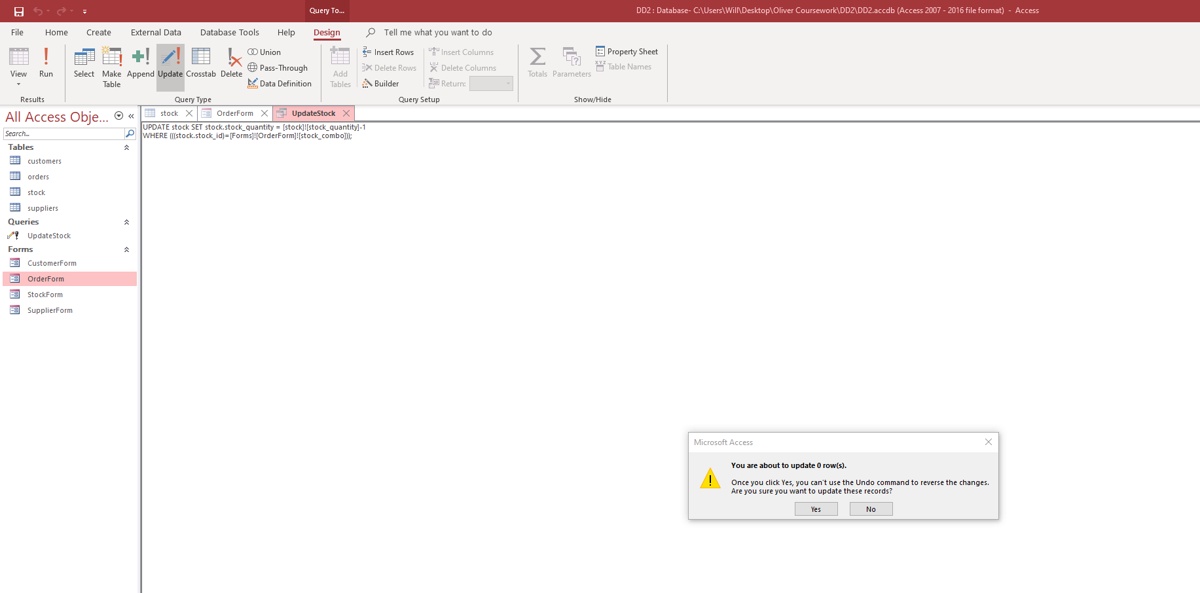
    The problem is that when I try and reference the form in my update query nothing happens, I simply get a prompt when I execute it saying "You are about to update 0 row(s)", I've tried taking out the "Where" clause from my query and it will subtract 1 from all the stock.stock_qua ntity records so I know its not a problem with the SET clause.

    The full SQL for my UpdateStock query is as follows:
    Code:
    UPDATE stock SET stock.stock_quantity = [stock]![stock_quantity]-1
    WHERE (((stock.stock_id)=[Forms]![OrderForm]![stock_id]));
    I've looked at multiple YT videos and even the offical microsoft access guides for this and so I think I have the right syntax. Any help is appreciated!
    Last edited by Exiis; Feb 6 '21, 07:35 PM. Reason: Removed Github link as question and answers are in the thread
  • NeoPa
    Recognized Expert Moderator MVP
    • Oct 2006
    • 32661

    #2
    I downloaded your database and, while the reference is different there from what you've posted, it does seem to be correct. My problem is that it worked first time. Did you post the question before fixing the reference and then forgot to test it?

    Comment

    • Exiis
      New Member
      • Feb 2021
      • 4

      #3
      Hi NeoPa,

      I'm not sure why it worked on your database but not mine that is very weird, I've included a gyazo screen shot of the error with the query in the background.


      Thank you

      Comment

      • ADezii
        Recognized Expert Expert
        • Apr 2006
        • 8834

        #4
        Works fine on my end also.
        1. Is [stock_id] the Bound Column for [stock_combo]?
        2. If it is, and you are still not getting the desired results, try a different approach referencing [stock_id] directly in the Combo Box:
          Code:
          CurrentDb.Execute "UPDATE stock SET stock.stock_quantity = [stock]![stock_quantity]-1 " & _
                            "WHERE stock.stock_id=" & [Forms]![OrderForm]![stock_combo].Column(0), _
                             dbFailOnError

        Comment

        • NeoPa
          Recognized Expert Moderator MVP
          • Oct 2006
          • 32661

          #5
          I really have no idea how a picture of it not working could help any of our understandings of the situation. I have no trouble believing what you say you're experiencing. The fact you have a different experience from ADezii & myself isn't a problem per se - it's information we can use to identify where the issue lies. The format is fine. It works in some circumstances which couldn't be the case were the format in error.

          What could be different? Is the form open when you run it? If so, what value is set in that control when you trigger the query to run? Is the database acually exactly the same as we're using? Or may there be some very minor modifications you assume won't make any difference, that you tried to see if you could find the problem? I would suggest doing your testing exclusively with your own posted database downloaded again into a separate area and never making changes that aren't posted to the thread.

          @ADezii.
          I understand that sometimes the SQL is incorrectly formatted and this can be got around by redoing it using literal values. However it seems clear in this case that isn't the situation. To avoid complicating matters even beyond the original state I would suggest we leave any alternative approaches aside until we have identified the actual problem. Such side-discussions have a tendency to make identifying the real problem, and thus helping the OP where they really need it, much harder to achieve.

          I'm sure there'll be an opportunity for more general advice once the real issue has been identified and there's no longer any danger of throwing that search off track.

          Comment

          • ADezii
            Recognized Expert Expert
            • Apr 2006
            • 8834

            #6
            Points are all valid, just curiosity creeping in.

            Comment

            • Exiis
              New Member
              • Feb 2021
              • 4

              #7
              Hi NeoPa,

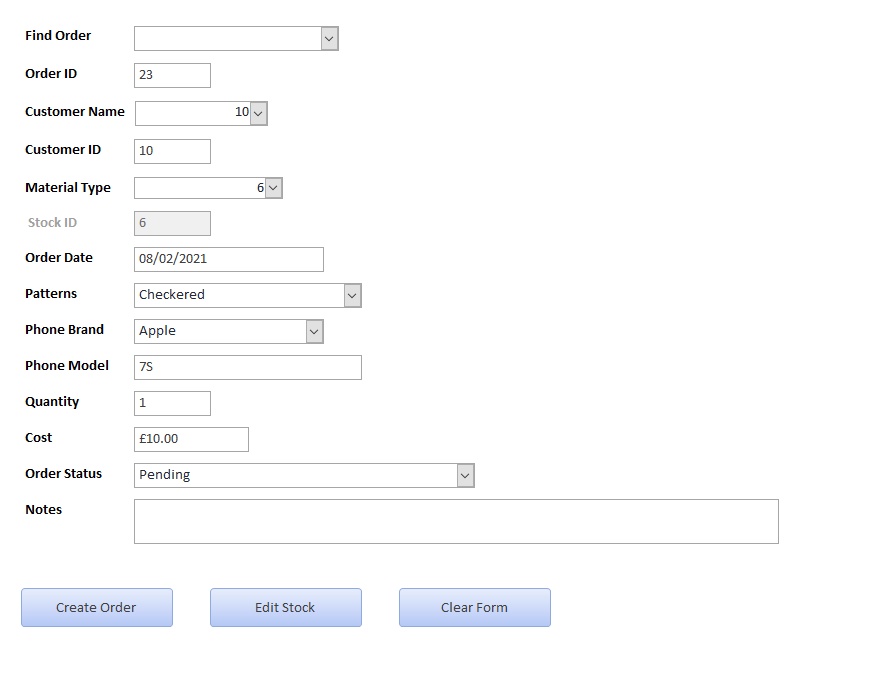
              I took your advice and redownloaded the database onto my computer. Alas it still didn't work, as you might already know, the update query is set to trigger upon clicking the "Create Order" button on my Order Form, of which the value in the "Material Type" combo box is taken as the stock_id for the update query to use. I've included a screenshot of how I'd fill the Order form out when trying to get this update query to work.

              My original goal was to take the "Quantity" field away from the "stock_quantity " field in the SET clause but as that didn't work (Due to the same issue with referencing forms) I decided to scale down my problem into simply trying to target a specific record with the form referencing.

              I was wondering if it could be due to my Microsoft Access version? I'm using Access 2007 with the 2016 File Format, is there a chance that it could be acting strangely due to this? I feel like something like that might be what is distinguishing our two experiences and @ADezii's as well.


              @ADezii

              To answer your question the [stock_combo] is simply me looking up the [stock_id] and [stock_name] for the record and saving the [stock_id] so I guess [stock_id] could be considered the bound column

              Comment

              • ADezii
                Recognized Expert Expert
                • Apr 2006
                • 8834

                #8
                I was wondering if it could be due to my Microsoft Access version?
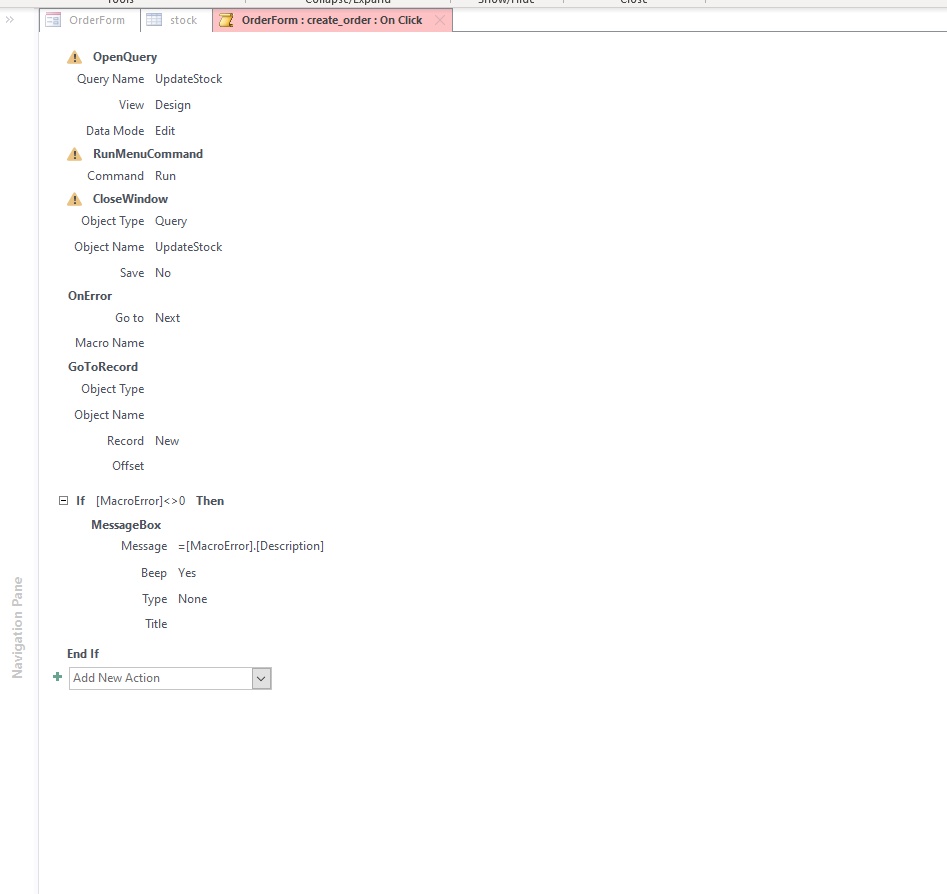
                In just loaded the DB into 2007 and here is what I came up with. The Click() Event of the Create Order Command Button is assigned to an Embedded Macro. Within that Macro, you are attempting to go to a New Record prior to executing the UpdateStock Query which will never work since the Criteria will never be satisfied (stock.stock_id )=[Forms]![OrderForm]![stock_id] or stock.stock_id) =[Forms]![OrderForm]![stock_combo]). Either Criteria will read the [stock_id], but in a New Record it would be meaningless, since it has yet to be initialized (it is an AutoNumber/Primary Key). Hopefully, this makes sense, or 2007 somehow corrupted the Embedded Macro.

                Comment

                • Exiis
                  New Member
                  • Feb 2021
                  • 4

                  #9
                  I fixed the issue by moving the 3 macros (OpenQuery, RunMenuCommand and CloseWindow) from the very bottom to the very top, meaning they would be launched first (See Screenshot)


                  Thank you both ADezii and NeoPa for the assistance!

                  Comment

                  • ADezii
                    Recognized Expert Expert
                    • Apr 2006
                    • 8834

                    #10
                    the update query is set to trigger upon clicking the "Create Order" button on my Order Form
                    This was the reason why we didn't find the problem until later on. I was executing the Query directly, once you stated where it was triggered, then the problem became obvious.

                    I'm sure that I can speak for NeoPa in stating, you are quite welcome.

                    Comment

                    • NeoPa
                      Recognized Expert Moderator MVP
                      • Oct 2006
                      • 32661

                      #11
                      Originally posted by ADezii
                      ADezii:
                      I'm sure that I can speak for NeoPa in stating, you are quite welcome.
                      Always. On both counts.

                      Originally posted by Exiis
                      Exiis:
                      I'm not sure why it worked on your database but not mine that is very weird
                      That'll be because what you were doing and what you told us about were two different things. You were clicking on a button that had not been mentioned up to that point in the thread. We were executing the query - being very careful not to involve anything that wasn't directly involved with the issue.

                      When testing your project it's always advisable to keep strictly to the KISS principle. I'll let you Google that if it's not something you recognise.

                      Comment

                      Working...