Conditional formatting

Collapse
X
 
  • Time
  • Show
Clear All
new posts
  • ESAKKI109
    New Member
    • Jul 2014
    • 13

    Conditional formatting

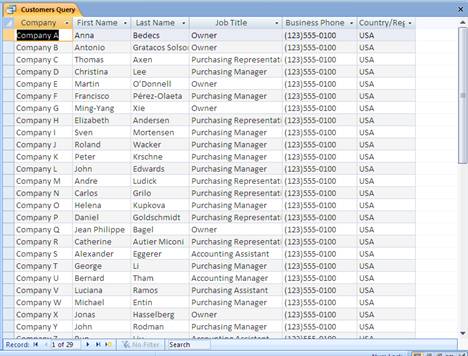
    Can we do conditional formatting in queries ? for example in the below image (customers query) can we highlight "owner" & "purchasing manger" with different color under Job title column ?
    If yes, how to do it .
  • Stewart Ross
    Recognized Expert Moderator Specialist
    • Feb 2008
    • 2545

    #2
    The presentation of queries does not provide any means to do what you ask. There is no conditional formatting available in Access as such, and even if there was it would not allow you to do what you ask.

    You could try using rich-text fields in forms (using the query grid for output will not help you here), but this is for the most part likely to involve VBA code rather than a query. I suspect it would be far from a simple requirement to implement, though what you have told us so far is too general for me to be sure about this.

    As the rich-text version would involve markup of words and so on you could look instead at providing, say, some form of HTML export in which you can format the output text in whatever way suits you.

    Either way, it is not available directly from within the built-in Access facilities without some form of intervention by you to either mark-up specific words and phrases or replace the text concerned with marked-up versions for display as rich text in forms.

    -Stewart
    Last edited by Stewart Ross; Jul 30 '14, 11:13 AM.

    Comment

    • twinnyfo
      Recognized Expert Moderator Specialist
      • Nov 2011
      • 3662

      #3
      Conditional Formatting is only available on Forms and Reports in MS Access.

      Comment

      • Stewart Ross
        Recognized Expert Moderator Specialist
        • Feb 2008
        • 2545

        #4
        The conditional formatting which Twinnyfo mentions, like Excel's, allows users to change, for example, background colours and so on. It cannot mark up and change individual words within a piece of text, which is really nothing to do with conditional formatting at all.

        -Stewart

        Comment

        • zmbd
          Recognized Expert Moderator Expert
          • Mar 2012
          • 5501

          #5
          Stewart is correct about highlighting individual words within the field.

          As for TwinnyFo's suggestion here's some information for ACC2007/2010 for conditional formatting within forms and reports

          --- http://office.microsoft.com/en-us/ac...010208133.aspx
          As you can see here you can change the font, font colour, background etc; however, it applies to the entire field


          --- http://msdn.microsoft.com/en-us/libr...ice.14%29.aspx
          Same thing here with the fonts, background, etc...

          Now there is as of ACC2007 a rich text field... careful with these as they are not compatible with other database types and expect will cause more heartburn than solution:
          Get help with your questions about Microsoft Access with our how-to articles, training videos, and support content.


          Not sure how to do this with vba and the update would be manual/coded.
          Last edited by zmbd; Jul 31 '14, 12:06 AM.

          Comment

          • ESAKKI109
            New Member
            • Jul 2014
            • 13

            #6
            Thank u all for your inputs

            Comment

            • NeoPa
              Recognized Expert Moderator MVP
              • Oct 2006
              • 32656

              #7
              In simple terms - No. It cannot be done from a QueryDef.

              However, if you're prepared to use a continuous form (or report) to show the query data then it can be done - using Conditional Formatting.

              To use Conditional Formatting you select the control which displays the [Job Title] field (EG. [txtJobTitle]) then :
              • If using version 2003 or earlier - Select Format (menu) | Conditional Formatting and enter your criteria.
              • If using version 2007 or later - Select (J)Format (ribbon) | Conditional Formatting and enter your criteria.


              As Stewart pointed out though, only the whole control gets formatted when this is done. From the data you posted this shouldn't be a problem in this instance, but is worth bearing in mind.
              Last edited by NeoPa; Aug 3 '14, 01:04 PM. Reason: Updated keyboard shortcut for >=2007.

              Comment

              Working...