Yes. You can do a custom install of Office 2007.
Instruct it to use a different folder, and not remove previous versions.
Only problem so far is that every time you switch versions, the installer
runs again to register the current version. The A2007 installer takes long
enough that I usually go and make a coffee. Not sure if that's good for my
health (getting up more often) or bad (more coffee and stress.) :-)
Access 2007 contains some seriously useful new functionality, e.g.:
- rich text for comments.
- built-in calendar popup for date fields.
- right-click combos to edit the underlying data.
- totals at bottom of datasheets.
- Search box in horizontal scrollbar.
- a download to export PDFs.
- ability to create a template database containing the setup you want to
include in every new database.
It also solves a number of existing issues, e.g:
- Trusted Locations solves A2003 security dialogs.
- MouseWheel.
- Email addresses get "mailto:" prefixed in hyperlink fields.
- Percent fields recognise percents.
- Warns if you create a field named Name, Date, Month, Year.
- Command buttons can show picture + caption.
- AutoFill in datasheets removed.
- Several filter bugs fixed.
- Improved Excel imports.
There's lots of other stuff that may or may not be useful:
- Multivalued fields and attachments
- Layout view
- Split forms
- Ribbon and Navigation Pane
- Tabbed layout of open forms.
- Modify database schema while using the data (datasheets.)
- Embedded macros with error handling.
And naturally, there's lots of bugs in anything with this much new stuff in
it, e.g.:
- Assigning a specific printer to a report doesn't work.
- OldValue is reported incorrectly for multivalued fields.
- Ribbon and minibar functionality don't work for rich text in subforms.
- Some other stuff is broken, e.g. text box set to:
=[Form].[RecordsetClone].[RecordCount]
- Interface issues, e.g. ribbon items still disabled after resetting on code
error.
--
Allen Browne - Microsoft MVP. Perth, Western Australia
Tips for Access users - http://allenbrowne.com/tips.html
Reply to group, rather than allenbrowne at mvps dot org.
"Ira Solomon" <isolomon@solom onltd.comwrote in message
news:j233o2lnk5 35fa50sqrhvdqjb p0oh6sael@4ax.c om...
>
Any quick opinions on Access 2007?
Has anyone got this to coexist with Access 2003?
Thanks
Ira
- Assigning a specific printer to a report doesn't work.
- OldValue is reported incorrectly for multivalued fields.
Allen,
Thanks for that great report on A2007! The new features look
interesting, but two of the bugs you mentioned kind of worry me. We
have several sticker printers in our factory and, of course, I must set
up those reports as specific printers. Is there a work-around?
If we are talking about the same feature, I use the OldValue as
part of an Audit Trail scheme I have in place.
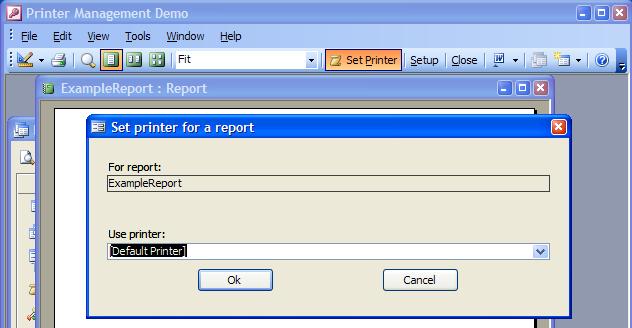
Free utility for Microsoft Access 2002 and later, so a report can be assigned to a particular printer on each workstation.
What that does is to allow the user to select one of their printers, and
have the report remember to go to that by default. Haven't tested it, but it
relies on previously existing technology, and should work in A2007.
OldValue will give you a problem for your audit log, but only if you use
multi-valued fields. You probably won't want to use those.
We are uncovering new bugs in A2007 each day. Today's is that the Spelling
Checker makes a mess of your words in a rich text field that contains a
carriage return. Others are preparing lists of bugs as well.
At this stage, my recommendation would be to wait until Service Pack 1 is
released for Office 2007 if reliability is important to you. Of course
there's no news of that yet, but I would not expect it before Q2-2007 at the
earliest. If you enjoy new technology for its own sake and don't mind
battling the bugs, then go for it.
Ultimately it will be a great product, but it's not yet.
--
Allen Browne - Microsoft MVP. Perth, Western Australia
Tips for Access users - http://allenbrowne.com/tips.html
Reply to group, rather than allenbrowne at mvps dot org.
"Hank" <hankrunner@aol .comwrote in message
news:1166179457 .246981.71300@j 72g2000cwa.goog legroups.com...
>- Assigning a specific printer to a report doesn't work.
>- OldValue is reported incorrectly for multivalued fields.
>
Allen,
>
Thanks for that great report on A2007! The new features look
interesting, but two of the bugs you mentioned kind of worry me. We
have several sticker printers in our factory and, of course, I must set
up those reports as specific printers. Is there a work-around?
>
If we are talking about the same feature, I use the OldValue as
part of an Audit Trail scheme I have in place.
>
Thanks again,
Hank Reed
"Allen Browne" <AllenBrowne@Se eSig.invalidwro te in
news:45821418$0 $21864$5a62ac22 @per-qv1-newsreader-01.iinet.net.au :
Only problem so far is that every time you switch versions, the
installer runs again to register the current version. The A2007
installer takes long enough that I usually go and make a coffee.
Not sure if that's good for my health (getting up more often) or
bad (more coffee and stress.) :-)
Have you checked if MichKa's A97 trick might have an analog in the
A2K7 MSI installer scripts?
At this stage I'm spending way to much time with finding workarounds for the
new bugs, but I am interested in the results if someone does try this.
--
Allen Browne - Microsoft MVP. Perth, Western Australia
Tips for Access users - http://allenbrowne.com/tips.html
Reply to group, rather than allenbrowne at mvps dot org.
"David W. Fenton" <XXXusenet@dfen ton.com.invalid wrote in message
news:Xns989A7DE 3235D4f99a49ed1 d0c49c5bbb2@127 .0.0.1...
"Allen Browne" <AllenBrowne@Se eSig.invalidwro te in
news:45821418$0 $21864$5a62ac22 @per-qv1-newsreader-01.iinet.net.au :
>
>Only problem so far is that every time you switch versions, the
>installer runs again to register the current version. The A2007
>installer takes long enough that I usually go and make a coffee.
>Not sure if that's good for my health (getting up more often) or
>bad (more coffee and stress.) :-)
>
Have you checked if MichKa's A97 trick might have an analog in the
A2K7 MSI installer scripts?
>


Comment