
Query with several dynamic fields

Collapse
This topic is closed.
X
X
 
  • Time
  • Show
Clear All
new posts
  • Stephan

    Query with several dynamic fields

    Hi all,

    I am looking for help regarding my query.

    I have a table containing different information about meetings such as
    date, topic, and 3 separate keywords assigned.
    Now, I would like to create a search form (and the underlying query) so
    that the user can search for any information.
    E.G he could limit the date range by providing a start or end date, or
    provide phrases of the topic and / or one or more of the keyword
    fields.
    If any field is left blank, the query should run through the whole set
    of records.

    Any hint is greatly appreciated.

    Thanks,
    Stephan
  • Allen Browne

    #2
    Re: Query with several dynamic fields

    It would be possible to create a query with a WHERE clause like this:

    WHERE ((([Forms]![Form1]![txtStartDate] Is Null)
    OR ([MeetingDate] >= [Forms]![Form1]![txtStartDate]))
    AND (([Forms]![Form1]![txtEndDate] Is Null)
    OR ([MeetingDate] < [Forms]![Form1]![txtEndDate]+1))
    AND (([Forms]![Form1]![txtKeyword] Is Null)
    OR ([Keyword1] = [Forms]![Form1]![txtKeyword])
    OR ([Keyword2] = [Forms]![Form1]![txtKeyword])
    OR ([Keyword3] = [Forms]![Form1]![txtKeyword])))

    There might be better ideas, such as creating a related table of the
    keywords, so each record can be associated with whatever keywords are neeed.

    You could also avoid the inefficiency of the unused criteria with approach
    suggested in this article:
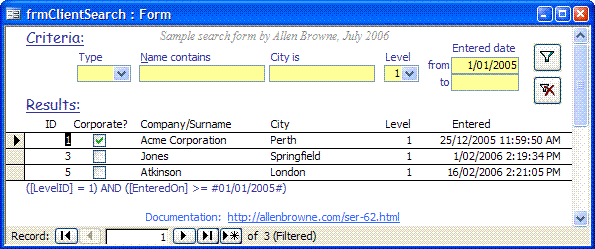
    Search form - Handle many optional criteria
    at:
    Free sample database for Microsoft Access 2000 and later, demonstrating how to build criteria from many optional entries, and handle different field types, exact matches, partial matches, and ranges.


    --
    Allen Browne - Microsoft MVP. Perth, Western Australia.
    Tips for Access users - http://allenbrowne.com/tips.html
    Reply to group, rather than allenbrowne at mvps dot org.

    "Stephan" <fred_feuer_ste in2001@yahoo.de wrote in message
    news:1153205185 .620562.249660@ i42g2000cwa.goo glegroups.com.. .
    >
    I am looking for help regarding my query.
    >
    I have a table containing different information about meetings such as
    date, topic, and 3 separate keywords assigned.
    Now, I would like to create a search form (and the underlying query) so
    that the user can search for any information.
    E.G he could limit the date range by providing a start or end date, or
    provide phrases of the topic and / or one or more of the keyword
    fields.
    If any field is left blank, the query should run through the whole set
    of records.
    >
    Any hint is greatly appreciated.
    >
    Thanks,
    Stephan

    Comment

    • user888
      New Member
      • Jul 2006
      • 6

      #3
      depending on the number of fields that my users can write criteria in, I use 2 approaches
      1 if there are a small number of fields I make 2,3, 4 max queries and depending on wheateh the user has writen somethin in the criteria field or not execute one of them
      2 if there are more options i write a procedure that generates the sql code of my query. someting like
      dim sql as string
      sql = "SELWCT * FROM ... WHERE "

      if isnull(me.crite riafield) then
      sql = sql & " [tablename].[fieldname]= "& me.criteriafiel d & ", "
      end if
      ...
      docmd.runsql sql

      hope this helps

      Comment

      Working...